







 Marketing Attribution
💡 Key Takeaways
- Shopify Analytics provides built-in tracking for your store’s daily sales, traffic, conversion rates, and standard metrics.
- Native reporting relies on basic last-touch attribution and cannot track multi-device customer journeys.
- As you scale paid advertising or email marketing across multiple platforms, native reports often misattribute sales or double-count conversions.
- NestAds is suitable for growing brands that wants to track ad performance, see customer journey across channels, and reduce wasted marketing budget.
If you want to grow your Shopify store, you need to track your numbers. Shopify gives you built-in analytics and reports to monitor your daily sales, traffic, and orders. But as your business expands, you might wonder if these native tools give you the full picture.
In this guide, I will show you what Shopify Analytics and reports can measure, where they fall short, and which alternative tools can help you fill the gaps.
What are Shopify Analytics and Reports?
Shopify Analytics and Reports give you data about your online store. They track your sales, customer traffic, orders, and daily operations.
Shopify splits this feature into two connected tools:
First, the Analytics dashboard gives you an immediate summary of your key store metrics. You can quickly see your daily sales, online store sessions, conversion rate, and average order value.
Second, Shopify Reports give you detailed numbers for specific areas of your business. If you want to check which products sell best or how much tax you collected, you pull up a report.
Together, these tools help you understand how your store performs. Store owners use the dashboard to check daily progress. Marketing and inventory managers use reports to make decisions, like when to reorder stock or which sales channels drive revenue.
How to access Shopify analytics dashboard?
Accessing your analytics dashboard takes just a few clicks from your desktop or mobile device. Here is how you can find it:
1. Log in to your Shopify admin account.
2. Look at the left-hand menu sidebar and click Analytics. You will land directly on your main Overview dashboard, where you can view your real-time store metrics.
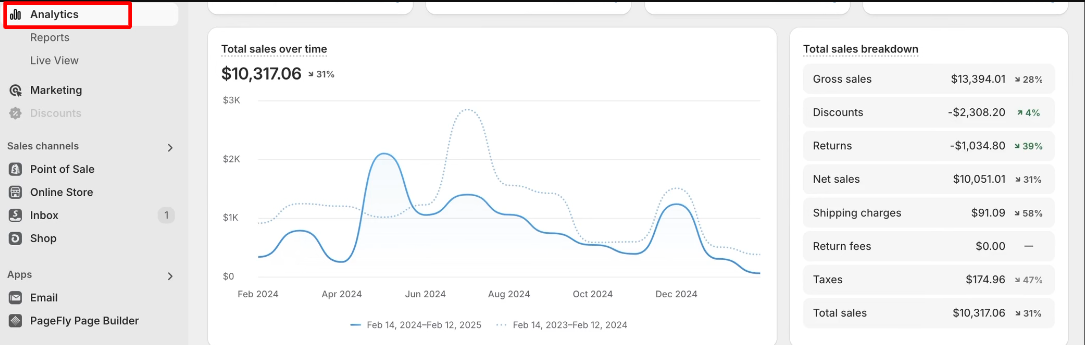
3. If you want to check specific detailed reports, click Reports listed directly under the Analytics section in the left sidebar. You can also adjust the date picker at the top right of the Analytics dashboard to filter your data or compare performance across different days, weeks, or custom date ranges.
What analytics and reports does Shopify provide?
Shopify includes several built-in reports to track your store activity. The platform collects this data automatically as customers browse and place orders. However, the exact reports you can view depend on your Shopify plan.
Here is a breakdown of what Shopify measures across its main reporting categories
| Reporting Category | Key Metrics Provided | Shopify Plan |
| Overview Dashboard | Total sales, store sessions, conversion rate, average order value, returning customer rate. | Available on all Shopify plans (except for Starter) |
| Sales Reports | Sales over time, sales by product, sales by channel, traffic referrer sales, and discounts. | Available on all Shopify plans (except for Starter). More detailed for Grow plan and higher. |
| Customer Reports | Customers over time, first-time vs. returning sales, customer locations, and repeat buyers. | Available on all Shopify plans (except for Starter). More detailed for Grow plan and higher. |
| Marketing Reports | Attributed sales by channel, sessions from UTM campaign links, and conversions by traffic source. | Available on all Shopify plans (except for Starter). More detailed for Grow plan and higher. |
| Product Reports | Store conversion funnel, site search terms, product recommendations. | Available on all Shopify plans |
| Finance Reports | Taxes collected, gross sales, payouts, shipping fees, and gift card balances. | Available on all Shopify plans |
As you can see, the capabilities of Shopify Analytics can vary based on the Shopify plan you used.
Generally, you can get a decent analytics dashboard with Grow plan ($105/month) and above. This is one of the crucial factors for choosing a Shopify plan; but before you decide to upgrade your plan, do consider if the features justify the costs.
Most businesses do not rely on just Shopify Analytics, they use tools such as Google Analytics and marketing attribution tools to get customer insights. These tools are not meant to replace one another, but rather serve different business goals.
Further reading: Shopify Analytics vs Google Analytics
What Shopify Analytics and Reports can’t tell you
Shopify built-in reporting covers basic store sales well. However, it leaves several data gaps as your store grows. Here are the main limitations broken down by business need:
Complete customer journeys
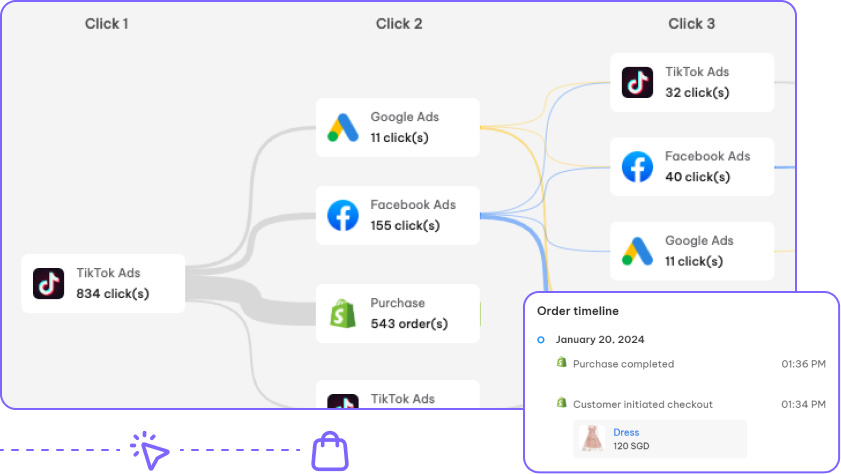
Most buyers visit your store multiple times before purchasing. A customer might see an ad on their phone, visit your site on a laptop later, and buy through an email link the next day. Shopify cannot track these multi-session, cross-device paths.
Furthermore, Shopify provides zero visibility into pre-purchase paths before a buyer lands on your site, leaving you blind to how shoppers interact with your brand across the web.
Advanced marketing attribution
Shopify uses simple last-touch attribution. Whichever ad or link brought the buyer to your store right before checkout gets 100 percent of the credit. It cannot track multi-touch attribution, assisted conversions, or offline sales. It also does not calculate combined marketing metrics across platforms like Google Ads, Meta, and TikTok.
User behavior analysis
Shopify relies almost exclusively on single-touch or simple last-interaction marketing attribution. This means whichever ad or channel drove the final click before checkout gets 100 percent of the sales credit.
In reality, modern paid media works as an ecosystem. Shopify cannot calculate multi-touch attribution, assisted conversions, or top-of-funnel brand awareness impact. If you rely on paid ads such as Google, Meta and TikTok, Shopify analytics cannot map the complex journey between ads click and store purchase.
Custom business reporting
Custom reports and advanced filtering are only available in Shopify Advanced plan ($399/month) and higher. Jumping from the $39 or $105 plan to $399/month strictly for reporting is rarely cost-effective. You often have to rely on third-party analytics tools to get a comprehensive, tailored reports every month.
Is Shopify Analytics enough?
Shopify Analytics is enough for new and small stores. It provides the core numbers you need to run daily operations, manage orders, and track simple sales.
However, as your business grows, native reporting is usually not enough. Adding new ad channels, scaling your product line, and managing larger customer bases requires more detailed tracking.
Here are three major reasons why growing stores need more than built-in analytics:
- Multiple ad channels cause double counting: Running ads on Google, Meta, and TikTok at the same time creates overlap. Each ad platform claims credit for the same sale in its own dashboard. Shopify last-touch attribution cannot show you true channel performance.
- Browser privacy updates limit web tracking: Privacy changes like iOS tracking rules and cookie blocks prevent web browsers from capturing full visitor data. While Shopify tracks backend orders accurately, front-end session data often misses traffic source details. Modern tracking requires server-side events and statistical modeling to fill browser privacy gaps.
- Conversion rate optimization needs behavioral data: Shopify standard reports show abandoned carts, but they cannot show you which page elements caused customers to leave.
Shopify Analytics vs NestAds Marketing Attribution
If you are running paid advertising across multiple channels, and regularly face data discrepancies, you may want to look at marketing attribution tools.
Here is a quick comparison of how NestAds Marketing Attribution fills the gap of marketing and customer journey reporting:
| Features | Shopify Analytics | NestAds |
| Primary Focus | General store performance, sales totals, inventory tracking, and traffic. | Multi-channel marketing attribution, ad performance tracking, and campaign optimization. |
| Attribution Models | Simple last-touch (last-click) attribution. | Multi-touch attribution models |
| Multi-Channel Tracking | Basic referrer tracking via UTM links. | Unified ad tracking that connects data across Facebook, Google, TikTok API, and Klaviyo. |
| Customer Journey Mapping | Tracks single-session activity | Visual touchpoint tracking showing visitor steps from initial ad click to completed checkout. |
| Tracking & Privacy Handling | Relies on standard browser cookies, impacted by browser privacy blocks and iOS tracking limits. | Uses first-party server-side tracking to capture ad conversion data despite ad blockers |
| Cost | Included in Shopify plans | Monthly subscription, flat rate (More about pricing) |
| Technical Setup | No setup | Requires initial setup |
| Scalability | For new and small Shopify stores | From medium to large businesses wanting to scale paid advertising |
With NestAds, you can integrate and track key metrics in:
Now, your marketing channels can be analyzed in more realistic way, which is how they actually interact and affect purchasing decisions. From there, you can start developing data-driven strategies and scale your business.
Best practices for using Shopify Reports
To get accurate insights from your Shopify data, follow these five practical habits:
- Review long-term trends instead of single-day spikes: Daily numbers fluctuate based on days of the week or weather. Look at rolling 7-day, 30-day, or 90-day windows to spot actual performance trends.
- Compare equivalent date ranges: Always compare date ranges against the same period from the previous year or equivalent days of the week. Comparing a holiday promotion directly to a normal weekday will give you misleading results.
- Combine sales, customer, and inventory reports: Do not look at marketing numbers in isolation. Check inventory sell-through rate before scaling ads so you do not run out of stock on popular items.
- Export raw CSV files for detailed spreadsheets: When built-in filters are too basic, export your sales logs as CSV files. You can open these files in Excel or Google Sheets to build pivot tables and custom cohort models.
FAQs: Shopify Analytics
Yes, you can export most Shopify Reports as CSV files directly from your admin panel. This lets you open raw store data in spreadsheet programs like Google Sheets or Microsoft Excel for deeper analysis.
Shopify tracks basic sales from referral links using a last-interaction model. It cannot calculate precise return on investment (ROI) or multi-touch attribution across complex ad campaigns on Meta, Google, or email.
No, Shopify Reports cannot replace Google Analytics 4. Shopify focuses on sales transactions and order processing. Google Analytics specializes in detailed visitor behavior, traffic channels, and website funnels.
The best tool depends on what you need. For marketing attribution, Triple Whale and Polar Analytics are strong options. For user behavior, Hotjar and Microsoft Clarity work well. For profit tracking, Lifetimely and BeProfit are top choices.





 Facebook Advertising