







 Shopify Development
If your website fails to convert traffic into paying customers, you are only going through half the battle.
A conversion rate optimization (CRO) audit allows you to identify the specific reasons visitors leave your store without purchasing. By analyzing your data and user experience layout, you can implement suitable strategies that increase your sales.
I have built and reviewed numerous high-converting online stores. In this guide, I will show you exactly how to conduct a successful Shopify CRO audit.
1. What is a Shopify CRO Audit?
A Shopify Conversion Rate Optimization (CRO) audit is a structured review of your online store. The main objective is to look at your website design and performance to see where customers experience friction.
When you perform an audit, you examine your store from the perspective of a user. You trace the exact path a buyer takes from the moment they land on your site to the final checkout confirmation screen.
A CRO audit gives you a concrete list of layout and functional improvements. Instead of changing your website design based on personal preferences, you make adjustments based on actual user behavior and analytics.
2. Why Your Shopify Store Needs a CRO Audit
This helps you uncover technical errors, confusing navigation elements, or copy deficiencies that cause people to abandon their shopping carts.
The economic environment for online stores has shifted significantly over the past few years. Relying entirely on social media advertising or search engine marketing to scale your business is not enough to compete.
Here is why you must prioritize your conversion rates:
- Rising customer acquisition costs (CAC): Acquiring new traffic has become incredibly expensive for independent brands. Data from Retainful indicates that the average ecommerce customer acquisition cost currently ranges between $68 and $84 depending on your product category. If your website suffers from a low conversion rate, you cannot recover these upfront marketing costs.
- Changes in consumer shopping behavior: Modern consumers expect fast, frictionless checkouts. Because buyers frequently shop on large, highly optimized marketplaces, they have low tolerance for slow loading pages, complex navigation menus, or unexpected charges during checkout.
- Sustainable competitive advantage: Most store owners react to a drop in sales by spending more money on ads or changing their creative assets. By focusing on your internal site optimization, you build a more efficient sales funnel.
Overall, a CRO audit helps you improve user experience, reduce cart abandonment, and drive more sales without spending more on ads.
3. How to Perform a Shopify CRO Audit (Step-by-Step)
There is no single framework that covers all business needs, but here are the key steps to review your store using data and visual tracking tools:
Step 1: Setting CRO audit goals
Before you begin reviewing your store, you must define what you want to achieve. A CRO audit can have different goals depending on your current business bottlenecks, and you can focus your attention on smaller, specific elements tailored to that exact goal.
If your primary goal is to increase your average order value (AOV), your audit should focus heavily on cross-sell placements, product bundling options on the product page, and cart-drawer upsell triggers..
If your goal is simply to boost the conversion rate of cold traffic, your focus will shift to your homepage above-the-fold clarity and your trust elements.
Narrowing your scope allows you to fix small, high-impact details rather than trying to overhaul your entire site at once.
Step 2: Analyze your Shopify analytics
To get a complete picture of your store performance, you need to combine quantitative metrics with qualitative behavioral insights.
Use CRO tools to find out why the exits are happening. You can integrate user analytics apps like NS Revenue Heatmap or Microsoft Clarity that specialized in heatmaps and session recordings.
These tools let you watch anonymous playbacks of real visitor interactions, and heatmaps show you exactly where users click and how far they scroll down your pages. For example, you could discover that 80% of readers leave your blog post before reaching your main call-to-action.
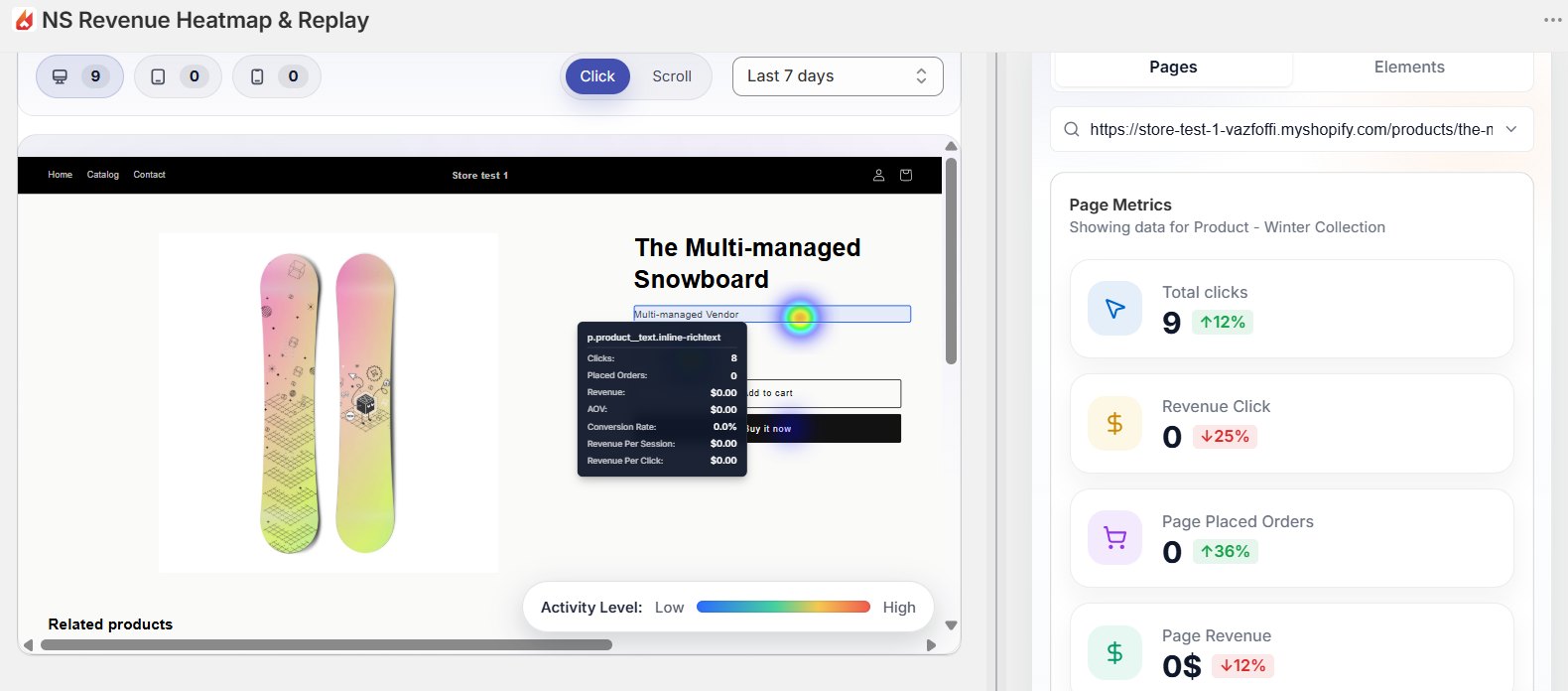
Instead of guessing, heatmaps help you gain objective and accurate data to analyze user behavior. Use and learn how to read a heatmap can do wonders for your online store.
Step 3: Evaluate the homepage and navigation
Your homepage must immediately clarify what you sell and who your products are for. Review your layout to ensure your primary value proposition sits above the fold, meaning it is visible on a standard phone screen without scrolling.
Next, test your main navigation menu. Use clear, descriptive labels for your categories. Do not use creative or ambiguous terms for your menu links.
You must also check your loading performance. Run your URL through Google PageSpeed Insights or check your online store speed score within Shopify. Slow loading times cause immediate bounces, so compress your image assets and remove unnecessary tracking scripts to keep your pages fast.
Step 4: Review collection and product pages
Your product pages often handle the heaviest lifting for conversions. Check your pages against these four essential design components:
- Product Media: Use high-resolution images that show the item from multiple angles. Include lifestyle photos so customers can understand the scale and real-world look of the product.
- Call-to-Action Buttons: Your Add to Cart or Buy Now button must use a contrasting color that separates it visually from your background. It should be large, easy to tap on mobile, and free of competing text.
- Product Copy: Write descriptions that focus on product benefits and solve customer objections. Avoid large walls of text. Use bulleted specs and short paragraphs to make the copy easy to scan.
- Trust Elements: Place star ratings and customer reviews directly below your product title. If your items carry warranties or safety certifications, add those trust badges right next to your checkout buttons.
You can see the detailed checklist of how to optimize product pages.
Step 5: Test small changes at one time
Once you have identified your store’s friction points, it is critical that you do not try to overhaul your entire design all at once. Doing so makes it completely impossible to figure out which specific adjustment actually helped or hurt your sales.
Instead, isolate smaller, individual elements based on the audit goals you established. For instance, if your data shows people are dropping off at the cart stage, try changing just the color or positioning of your primary checkout button first.
Test these minor tweaks sequentially, monitor improvement with CRO tools or Shopify analytics for a week or two, and let the data prove which small updates yield the biggest boost to your bottom line.
4. Most Frequent CRO Mistakes to Avoid
When completing your Shopify audit, make sure you avoid these common optimization mistakes:
- Ignoring the mobile experience: Many merchants design their storefronts exclusively on a desktop computer, neglecting the layout where the vast majority of modern e-commerce traffic actually happens.
- Overusing aggressive urgency tools: Adding too many countdown timers, stock scarcity bars, and promotional pop-ups irritates your visitors and obscures your actual product information.
- Relying on generic product description: Using unedited, supplier-provided text fails to explain your unique product advantages and leaves basic customer objections unanswered.
- Neglecting site speed and broken code: Leaving broken layout elements or old, abandoned app scripts intact degrades your page performance and drives bounce rates up.
- Changing too many elements at once: Implementing multiple design updates simultaneously prevents you from identifying which specific adjustment actually helped or hurt your sales.
FAQs: Shopify CRO Audits
You should conduct a comprehensive CRO audit at least every 6 month. You should also run a shorter, targeted audit whenever you change your Shopify theme settings, install new apps, or launch a significant seasonal marketing campaign.
No, you do not need coding knowledge. A professional audit centers on user experience and utilize CRO tools built into your Shopify store. You only need to understand and analyze the data correctly.
The average ecommerce conversion rate falls between 2.5% and 3.0%. If your conversion rate drops below 2.0%, your store has visible usability issues that you need to resolve.