







 Google Advertising
Google Ads Smart Bidding can scale your ecommerce store automatically. You set your target budget or return goals, and Google uses machine learning to find your buyers.
But there is a problem in using Smart Bidding not knowing that it needs good conversion data to actually bring results. If your tracking system misses a large portion of conversions, your automated bidding will make bad decisions with your money. This data gap drives up customer acquisition costs and shrinks your profit margins.
Whether you are an online merchant, a brand marketer, or an agency account manager, you need accurate data to win. This guide explains exactly how missing data breaks Google Ads Smart Bidding and how you can fix it.
💡 Key Takeaways
- What is the true ‘cost’ of Google Ads Smart Bidding? Your conversion data. This bid strategy uses Google’s AI to analyze your historical conversions and identify target audience.
- What is the fastest way to fix missing conversion data Activate Google’s built-in Enhanced Conversions feature or use server-side tracking to scale your business long-term.
- How does server-side tracking protect ad budget? It bypasses the customer’s web browser and reports much more accurate conversion data, helping you optimize ad spend and performance.
Understanding the basics: How Google Ads Smart Bidding works
Smart Bidding is one of the most effective Google Ads bidding strategies, and it does not rely on manual guesswork. It relies entirely on conversion signals.
The learning phase
When you start an automated campaign, Google enters a training period called the learning phase. During this time, the algorithm tests your ads and analyzes your audience.
Every time someone searches for your product, an instant auction happens. Google evaluates thousands of real-time signals at once, including the user’s device, their operating system, the time of day, their location, and their immediate search intent.
The system compares these signals against your conversion history. If a user matches the profile of a past buyer, Google raises your bid to win the ad placement. If the user looks like a casual browser, Google lowers your bid.
According to Google, this learning phase usually takes three weeks or 1-2 conversion cycles. The machine requires a steady stream of consistent data to find profitable patterns. Without enough initial conversion signals, the campaign cannot optimize properly.
Data quality is critical to Smart Bidding
Smart Bidding operates purely on historical conversion records. The algorithm has no human context, meaning it cannot know if your product is trending on social media or if your store checkout page is experiencing technical issues. It only knows what your tracking tags report.
When you feed the system complete and accurate data, it makes highly reliable bidding decisions during the live auction. Clean data allows the machine to lower your costs by identifying high-intent shoppers who match your ideal buyer profile.
When your data is broken or incomplete, the algorithm faces significant challenges. It begins to optimize for the wrong consumer actions, reports incorrect revenue values, and loses track of where your actual sales are coming from. This results in wasted ad spend because the machine is forced to guess wildly inside the ad auction.
The real cost of Smart Bidding: conversion data
Missing conversion is not just a reporting issue that affects your monthly analytics. In reality, incomplete tracking directly changes how the Google Ads automation algorithm bids on live traffic and handles your daily budget.
When Google bids on incomplete data
When ad blockers or privacy settings block your tracking tags, successful conversions don’t get recorded in your Google Ads dashboard. When this happens repeatedly, the algorithm flags those audience profiles as unprofitable. It lowers your bids and stops showing your ads to similar users, meaning you are accidentally training the machine to avoid your real customers.
This lack of data also prevents the system from hitting the baseline numbers it needs to make smart decisions. According to official Google Ads Help Center requirements, automated bidding requires a steady data volume to optimize bids effectively, for example for Target ROAS strategy:
- Search campaigns: A minimum of 15 conversions within a 30-day window.
- Video action campaigns: A minimum of 30 conversions within a 30-day window.
When tracking gaps drop your numbers below these official targets, the machine is starved of true information. Instead of bidding accurately to scale your business, the algorithm is forced to guess, which quickly inflates your ad costs or leads to poor performance.
Missing data distorts CPA, ROAS, and CPC
Let’s take a look at all the Smart Bidding strategies:
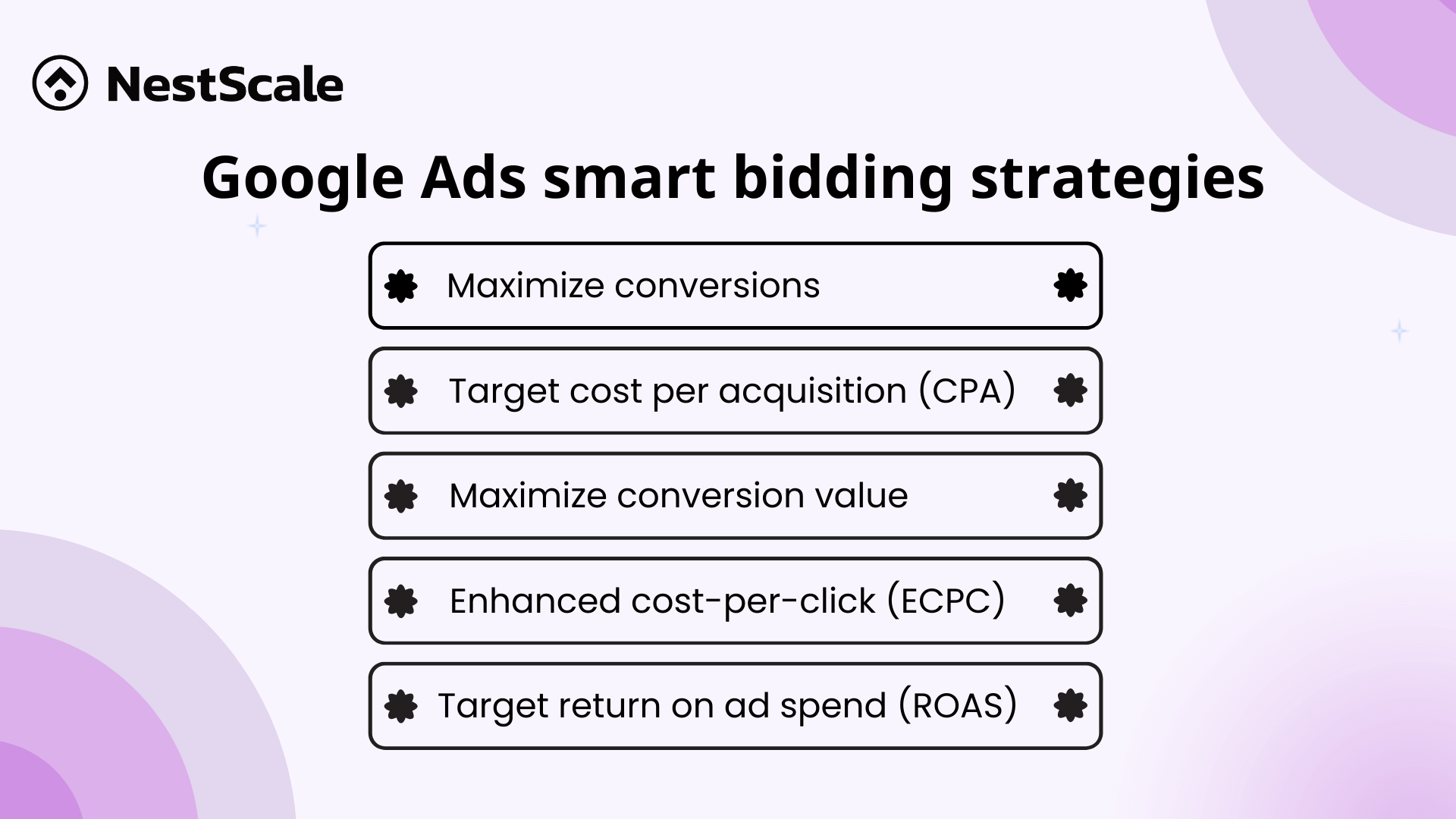
Each strategy focuses on maximizing a key metric. When conversion data goes missing, the underlying mechanics of your automated campaigns break down and render these strategies inefficient, for example:
- Cost Per Acquisition (CPA) rises falsely because the dashboard records all of your ad spend but misses a portion of your successes. This makes your campaigns appear far more expensive than they actually are.
- Return on Ad Spend (ROAS) drops on paper. Because the system sees less revenue than your store actually generated, you might assume a profitable campaign is failing and turn it off prematurely.
- Third, your Cost Per Click (CPC) can climb high. In fact, Smart Bidding naturally causes higher CPC during the learning phase, yet inaccurate data may make it goes out of control.
How to actually make Google Ads Smart Bidding smarter
You can fix these data gaps using practical, grounded methods. It is best to start with a free built-in solution before moving to server-side tracking.
Activating Google’s built-in “Enhanced Conversions”
The fastest way to improve data accuracy is to turn on Enhanced Conversions inside your Google Ads settings.
When a customer buys from your store, they type their email address and name into your checkout form. Enhanced Conversions takes this data, hashes it securely using privacy-safe encryption, and sends it to Google.
Google matches this hashed data with its own database of logged-in users. If a customer clicked your ad but their browser blocked standard cookies, Enhanced Conversions connects the purchase back to the original click. According to official case studies published on the Google Business Resources Portal, early adopters of this feature saw a median conversion rate increase of 5% on Search campaigns by restoring these lost data links.
You can turn this on through these steps:
- Go to your Google Ads account, click Tools and Settings, and select Conversions.
- Click on your main purchase conversion action.
- Scroll down to the Enhanced Conversions section and check the box to enable it.
- Choose your setup method. Most platforms like Shopify or WooCommerce offer an automatic API setup or integrate directly via Google Tag Manager.
- Save your changes.
Using server-side tracking to prevent leaked data
Enhanced Conversions helps, but it still runs through the user’s web browser. To secure your data fully, you should use server-side tracking.
Standard browser pixels regularly miss 10% to 40% of conversion data due to cookie restrictions and privacy tools. This stops being just a matter of bad reporting when ad platforms, such as Meta and Google, keep pushing for AI and machine learning. To take advantages of these powerful bid strategies, you need to have clean data input.
Server-side tracking removes the browser from the equation. When a customer completes a purchase, your website platform processes the order on its own internal server. Your server then sends a digital receipt directly to Google’s API behind the scenes.
Because this data move happens directly between servers, browser extensions and ad blockers cannot block it. Moving to a server-to-server setup provides the accurate data your Smart Bidding engine needs to optimize your real return on investment.
Audit the data to know when to take actions
You can check how much data your account is losing with a quick ten-minute audit.
First, check your e-commerce platform backend for the past month. Write down the total number of real completed orders.
Second, open your Google Ads account for the exact same date range. Look at your conversions tab and note the number of purchases reported by Google.
If your calculation shows a gap larger than 10%, your automated bidding strategy is starved for data. You need to fix your tracking setup before scaling your ad budgets.
👉 Related:
Manual CPC vs Maximize Conversions: Which Strategy Wins?
Google Ads for eCommerce: 13 Strategies to Boost Conversion
Optimize Google Ads for Conversions: How to Do It Effectively?
Google Display Ads Optimization: 8 Tips to Boost Your Performance
FAQs about Google Ads Smart Bidding
The “best” Google Ads bidding strategy is completely dependent on your main advertising objective; there is no one-size-fits-all solution. Because Google’s AI-powered Smart Bidding techniques modify bids in real-time for each auction, they typically produce the best outcomes.
Avoid panic-switching to manual bidding during a short-term performance dip. When campaigns enter a learning phase or adjust to data tracking fixes, minor fluctuations are completely normal. Only consider manual bidding if your campaign consistently logs fewer than 15 conversions a month, or if you run tight, high-intent brand keyword groups where you must enforce rigid cost-per-click ceilings to protect your margin.
Industry data and consensus across r/googleads indicate that a campaign needs a minimum baseline volume to exit the learning phase effectively.
– Bare Minimum: 15 conversions per campaign within a 30-day window.
– Recommended Optimal Baseline: 30 to 50 consistent conversions per campaign monthly.
If your campaign logs fewer than fifteen sales a month, the algorithm does not have enough mathematical parameters to spot buyer patterns, causing it to chase cheap, non-converting clicks instead.
The ideal server-side tracking tool depends heavily on your website platform and technical resources. For high-volume Shopify stores, NestAds is a great solution because it features native integrations and cross-platform multi-touch attribution. If your team already uses Google Tag Manager and wants an affordable, flexible cloud infrastructure setup, Stape offers excellent value with built-in power-ups like cookie persistence.