







 Google Advertising
It’s nice when you use paid ads and see traffic coming in, yet once you see just how much you are paying for that number of traffic…
This is a common struggle for anyone running paid ads, even for PPC experts. The truth is, no matter how much you optimize, you are never going to have zero wasted ad spend.
But of course, there are proven ways to minimize ad spend without decreasing results.
This guide will walk you through a practical framework to identify hidden ad waste, fix structural errors in your campaigns, and implement tracking that shows you exactly which ad creative makes you money.
💡 Key Takeaways
-
Stop letting ad platforms default you into efficiency traps. Whether it is Meta pushing broad targeting with weak conversion signals, or Google Ads hiding useless search terms under Broad Match and draining 76% of your budget, the solution is aggressive human intervention, strict data filtering, and absolute message relevance.
Why Modern Ad Platforms Waste Budget by Default
Ad platforms like Google and Meta are built to scale. They want to help businesses reach as many people as possible. However, their default settings are designed for their business model, which relies on maximum ad delivery.
If you accept every default recommendation, the platform will display your ads to an incredibly broad audience, which is one of the top Google Ads mistakes for beginners.
The Risks of Using Broad Targeting on Small Budgets
Many platforms encourage you to use broad targeting. The theory is that the system’s algorithm will learn over time who your ideal customer is and find them automatically.
This can work for established brands with a high budget, what happens to smaller merchants?
Algorithms require a high volume of data to learn effectively. If your budget is modest, your campaigns will not generate enough conversion signals quickly. Instead of optimizing, the system stays in a perpetual learning state. This means you end up paying for a continuous stream of random impressions that rarely lead to purchases.
Hidden Costs in Default Settings
Another common way platforms drain your budget is through automatic placements.
When you build a new campaign, settings like Google Search Partners or Meta Audience Network are checked by default. These options push your ads far beyond main search result pages or core social media feeds.
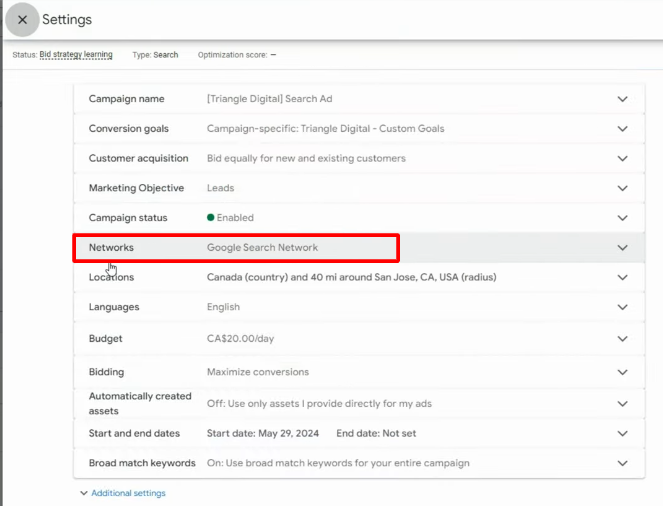
Your ads might appear inside mobile games, on third-party blogs, or next to low-quality content. On your dashboard, it may look like your ads are performing well because traffic is up. But if you look closer, you will see that the conversion rate for this traffic is incredibly low.
By reviewing your placement reports and turning off external partner networks, you can keep your ads focused on high-intent environments where real buyers look for products.
Practical Steps to Find and Remove Ad Waste
To stop your ad account from losing money, you must perform manual account audits regularly. You cannot rely solely on automated optimization scores. Fixing your account requires analyzing your actual performance reports and moving your capital to where it performs best.
- Reviewing the Search Terms Report
- Moving Your Budget to High-Performing Keywords
- Improve Message Match and Quality Scores
- Fixing the Location Settings Trap
- Audit the Cost of “Other Search Terms”
- Tracking Ad Spend Across Multiple Ad Channels
Reviewing the Search Terms Report
If you run search ads, your keywords are not always identical to what people type into Google. This is especially true if you use broad match types. To find out what users actually see before clicking your ad, you need to look at your Search Terms report.
The average ad account can waste over 40% of its budget on search terms that fail to generate a single conversion. When you open your report and filter for search terms that have spent money but show zero conversions, you will likely find irrelevant queries that have nothing to do with your store.
That is why adding negative keywords is one of the most common, yet still effective strategies for Google Ads.
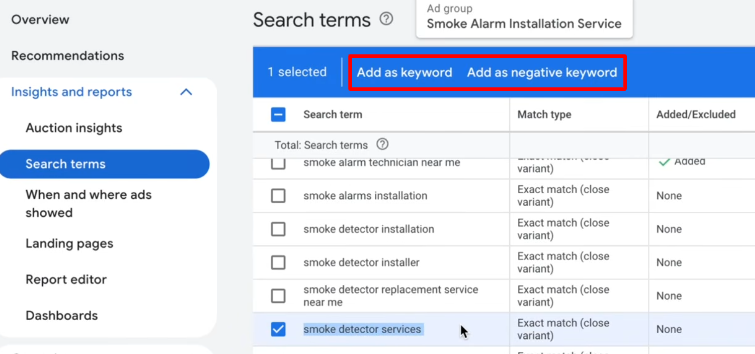
To make your negative keyword strategy truly effective, you should avoid simply adding full phrases from your report as exact match negatives. If you block an entire phrase, you only stop that exact sequence of words. To protect your budget efficiently, use these two practical strategies:
- Isolate and block the root word using Phrase Match: Look at the non-converting search term and identify the single word that alters the buyer’s intent. If you sell premium products, words like “cheap,” “wholesale,” or “repair” are root words that indicate the user is not your customer. Add these individual words as phrase match negatives.
- Organize your terms into Shared Negative Lists: Do not apply negative keywords to individual campaigns one by one. Instead, create Master Negative Lists in your account’s shared library, categorized by theme. When you launch a new campaign, you can apply these pre-built lists with one click. This prevents you from paying for the same bad traffic twice.
Moving Your Budget to High-Performing Keywords
Once you stop the leak from non-converting terms, you will free up a portion of your daily budget. What should you do with that newly recovered money? Unfortunately, many merchants make the mistake of just pocketing the savings or lowering their overall cap.
Instead, you should use it to fund your winning keywords.
Look through your data over the last three to six months and identify keywords with a conversion rate higher than 2%. Next, look at a metric called Search Impression Share. This metric tells you the percentage of times your ad showed up out of the total times it was eligible to show.
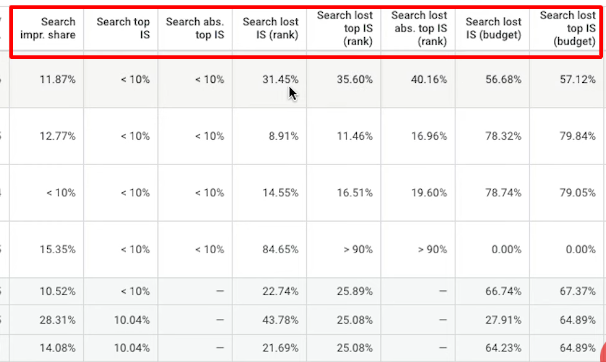
If your best keyword has an impression share of only 40%, it means you are missing out on 60% of your potential market because your budget was split across less effective terms.
By reallocating your saved funds to these proven winners, you can push their impression share toward 90%. This allows you to win more sales from traffic you already know converts, keeping your total ad spend steady while increasing your revenue.
Tips: When a keyword proves it can convert consistently, pull it out of large, mixed ad groups. Place it into its own targeted campaign using Exact Match. By giving your top terms a dedicated budget, you guarantee they achieve a 90% or higher impression share, converting customers from your best traffic.
Improve Message Match and Quality Scores
Google Ads determines how much you pay per click based on a metric called Quality Score. A high Quality Score tells the platform that your ad is highly relevant to the user’s search query.
When your quality score improves, the platform rewards you by lowering your actual cost per click and giving your ad a better position.
The most effective way to improve this score is by practicing strict message match. Message match is the visual and verbal consistency between your ad copy and your landing page.
When the landing page does not show what the ad promises, the user gets confused and leaves your site, which lowers your conversion rate and hurts your Quality Score.
To keep your costs down and your conversion rates high, use this actionable landing page mapping strategy:
- Ditch the Homepage Link: Never send your paid traffic to your homepage or a generic catalog page. If your ad features a specific product collection or a specific offer, the landing page must focus entirely on that specific collection.
- Optimize Page Speed for Mobile Traffic: A slow page destroys a good message match. If your page takes longer than three seconds to load on a mobile device, shoppers will click away before seeing your offer. This signals to Google that your page is irrelevant, which lowers your Quality Score and raises your advertising costs. Use compressed images and clean up heavy scripts to keep your loading times fast.
Read more: Facebook Ads Cost per Click (CPC): Definition & How to Lower It
Fixing the Location Settings Trap
When you select a target market like the United States or the United Kingdom, you assume the ad platform will only show your ads to people physically living there. Unfortunately, that is rarely the case.
By default, Google Ads sets your geographic targeting to “Presence or Interest: People in, regularly in, or who have shown interest in your targeted locations.”
And what about that, you ask?
If a user in a completely different country searches for your product category and appends your target location to their query, they will trigger your ad. For example, a user in Europe looking up “US fashion boutiques” will see your ad, click it, and realize shipping costs are too high.
See what happens if you leave this default setting on? You pay a premium domestic cost-per-click for international traffic that cannot realistically convert.
Many accounts reported that thousands of dollars are actively wasted on clicks from foreign countries because of this single hidden setting. To eliminate this waste immediately, follow these steps:
- Open your campaign Settings and expand the Location Options tab.
- Change the target setting from the default option to Presence: People in or regularly in your targeted locations.
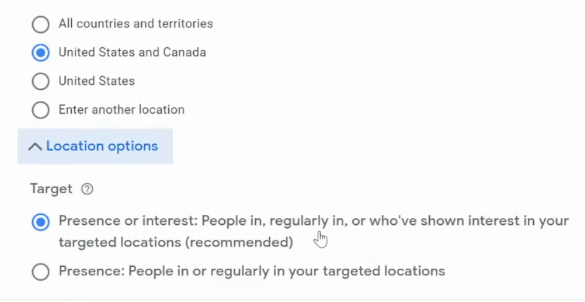
- Review your geographic location report under the “User Location” view, not just the “Geographic” view, to verify exactly where your physical traffic is originating.
Auditing the Hidden Cost of “Other Search Terms”
Many search marketers rely heavily on the standard Search Terms report to find negative keywords. However, modern privacy shifts have introduced a major blind spot.
Google hides a large percentage of search queries that do not reach specific volume thresholds, grouping them into a single line item at the bottom of your report labeled “Other search terms”.
Depending on your niche, this hidden bucket can absorb anywhere from 20% to over 50% of your total campaign spend.
Even 100% exact match campaigns frequently suffer from massive budget bleed hidden inside this unlisted category. If you cannot see the specific keywords, you cannot add them as negatives.
To bypass this platform limitation and regain visibility into your data, change how you run your query audits:
- Navigate away from the standard keyword report and open the Search Terms Insights tool located on your account’s Insights page.
- Review the aggregated query themes and intent categories. Even though Google hides individual low-volume search phrases, this dashboard groups those hidden keywords into broader, viewable consumer categories.
- Analyze the conversion rates for these automated category groups. If you find a specific category theme that has spent a significant portion of your budget with zero conversions, you can add that entire top-level theme as a negative category, forcing the algorithm to stop spending money in that unlisted territory.
Tracking Ad Spend Across All Ad Channels
Because each ad network uses different attribution models and privacy settings, looking at them separately leads to over-reported conversions and hidden budget waste.
To track cross-channel spend accurately, you must establish a single, unbiased source of truth.
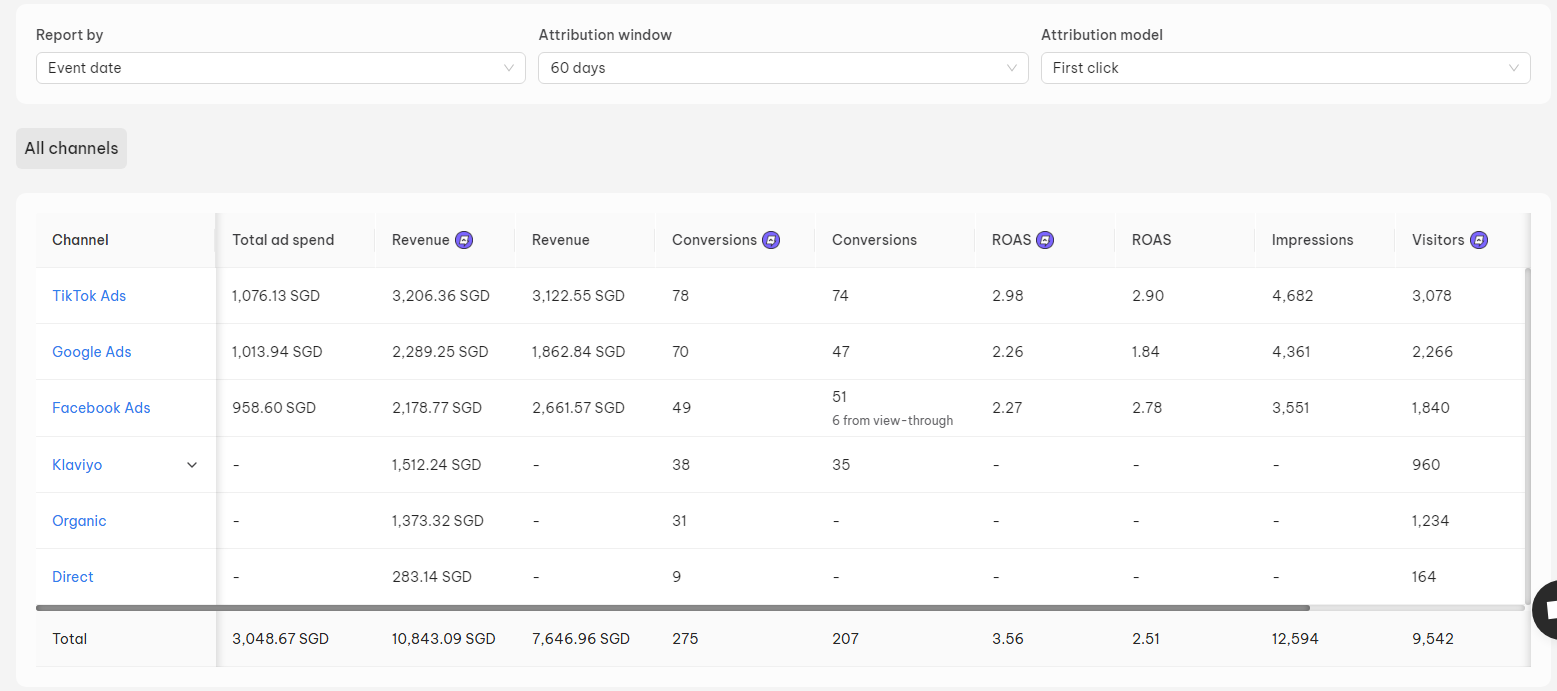
Ad platforms rely heavily on data modeling and data estimation due to modern privacy restrictions (such as iOS updates and cookie blocking). To see exactly how your budget interacts across the entire funnel, implement a cross-platform ad tracking tool.
This allows you to see the actual customer journey — for instance, realizing that a customer first clicked a Meta prospecting video, clicked a Google Search ad three days later, and finally converted via an email flow. Knowing the exact path prevents you from accidentally turning off an upper-funnel ad channel that looks unprofitable on paper but is actually fueling your entire ecosystem.
👉 Related:
How Much Do Google Ads Cost? A Quick Guide to Optimize
How Much Do Facebook Ads Cost? Benchmarks & How to Reduce It
How Much Do TikTok Ads Cost? 2026 Data & Cost-Saving Tips
Shopify Advertising Costs: A Guide To Optimize Your Ad Spend
FAQs: Minimize Ad Spend
Sellers track budget waste by pulling platform reports that isolate ad spend against actual backend business outcomes, rather than relying strictly on the ad network’s reported conversion metrics. They also use an ad attribution tool to detect wasted ad spend for all ad channels (Google, Meta, TikTok).
Trim away underperforming campaign dimensions and redirect that saved budget entirely into your highest-converting segments. You can achieve this by turning off broad platform settings like Google Search Partners, setting negative bid modifiers on low-converting devices or regions, and moving your budget into exact-match keywords that carry explicit buying intent.
Batch your account optimizations to once a week instead of making daily adjustments to prevent manual edits from disrupting the platform’s algorithm. To maintain campaign stability, ensure you also limit any simultaneous budget adjustments to less than 20% of your total campaign allocation.
Exclude malicious or invalid traffic by tightening your platform targeting parameters and utilizing strict exclusion rules. To do this, change your geographic settings from “presence or interest” to “presence only” to block out-of-market clicks, proactively add known click-farm IP addresses to your account exclusion list, and deploy third-party click fraud detection software to automatically block automated bots in real time.




 Facebook Advertising