







 Shopify Development
Once a visitor finally decides to buy from you, you need to make the most of that conversion.
Improving your Average Order Value (AOV) is the most efficient way to scale your revenue because it relies entirely on the traffic you already have.
In this guide, I will share 9 direct, ad-free strategies that you can implement to increase your cart sizes. These tactics are straightforward, require zero ad spend, and focus completely on enhancing customer experience. .
1. What is the AOV on Shopify?
Average Order Value (AOV) on Shopify is the average dollar amount a customer spends every time they place an order.
It is important to note that AOV tracks individual checkout transactions, not the total amount a single customer spends over their entire purchase history.
When you successfully improve this metric, you directly increase your profit margins. Other key metrics, such as your cost per order and ads budget, can be lowered while your revenue goes up.
2. Shopify AOV calculation formula
You can easily calculate your baseline performance by looking at your store data over a specific window of time, such as the last 30 or 60 days.
The mathematical formula is simple: Average Order Value = Total Revenue ÷ Total Number of Orders

To give you a real-world benchmark, data from Chargeflow indicates that the average AOV on Shopify is approximately $85.
If your current baseline sits significantly below this number, your store will benefit greatly from the layout and offer optimizations detailed below.
3. Top proven strategies to increase Shopify AOV
Before we break down the execution steps for each strategy, here is a quick overview of the 9 tactics we will cover:
- “Frequently Bought Together” bundles
- Free shipping threshold
- Tiered volume discounts
- In-cart upsells
- Customer loyalty and rewards program
- Additional services (e.g., gift wrapping)
- “Build Your Own Bundle” setups
- “Complete the Look” section
- Integrate Buy Now, Pay Later (BNPL) options
3.1. “Frequently Bought Together” bundles
When a customer views a product, they are often looking for a complete solution. You can make their shopping experience much easier by grouping highly compatible products directly on the main product page.
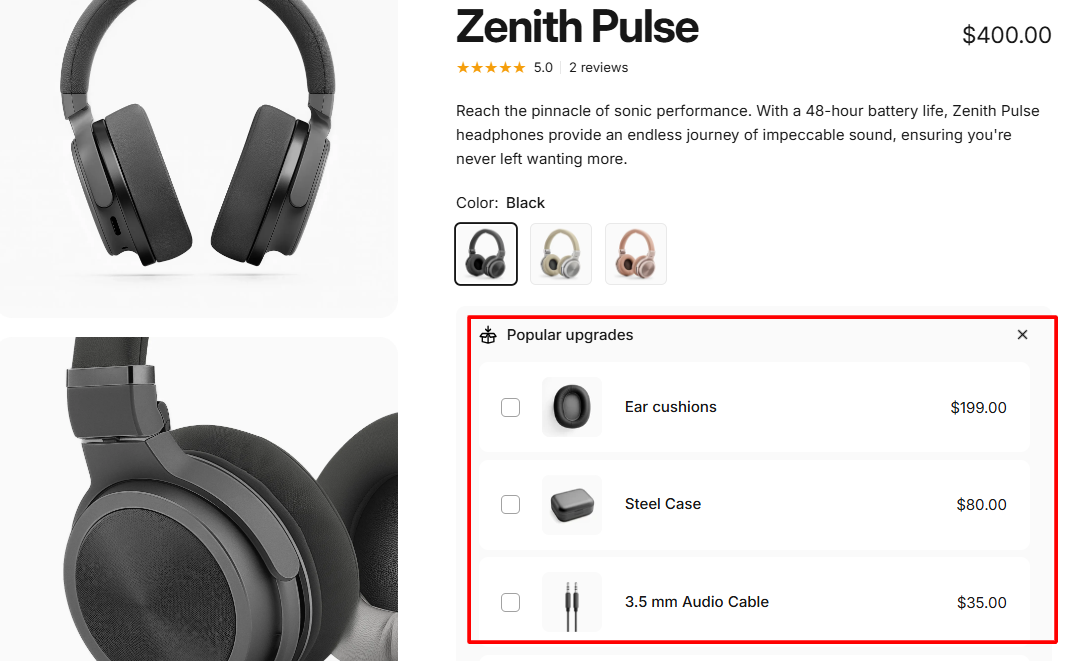
If you sell a camera body, for example, your customer will also need a lens, a compatible memory card, and a carrying case. Instead of making them search your entire site for these accessories, display them together with a clear “Add all items to cart” button. To increase conversions, you can offer a small 10% discount when they purchase the items as a complete group.
3.2. Free shipping threshold
Unexpected shipping fees are the leading cause of cart abandonment online.
You can solve this issue and increase your order size by setting a strategic free shipping threshold. To find your ideal target number, add 15% to 20% to your current baseline AOV. If your current average order size is $50, you should set your free shipping minimum at $60.
Shoppers would almost always rather add a small, useful item to their order than pay that same money toward standard shipping fees.
3.3. Tiered Volume Discounts
If you sell everyday essentials, consumables, or products that make great gifts, volume discounts are highly effective. This strategy directly rewards customers for purchasing multiple units of the exact same item.
Instead of running a sitewide sale, display a clear volume pricing tier on your individual product pages. You can lay this out using a clean pricing table.
This approach is essential for B2B businesses, and works exceptionally well for apparel basics, specialty coffee beans, and skincare products. It shifts the consumer’s focus from evaluating a single item to choosing the quantity that offers the best value.
3.4. Customer Loyalty and Rewards Program
A structured loyalty program gives your customers a clear incentive to hit higher spending milestones during a single visit. By using a clear points system, you encourage shoppers to maximize their cart totals.
For example, you can award 5 points for every dollar spent and clearly state that reaching 500 points unlocks an immediate $10 store credit coupon. If a customer sees that their current cart total is $85, they know they are close to hitting the 500-point milestone. This transparent target prompts them to find an extra item to unlock the reward. I suggest using reliable Shopify integrations like Smile.io to manage these tier systems cleanly.
3.5. In-Cart Upsells
The slide-out cart drawer is excellent real estate for last-minute cross-selling. When a user opens their cart drawer, they are highly motivated to buy, making this the perfect place to highlight small, inexpensive accessories.
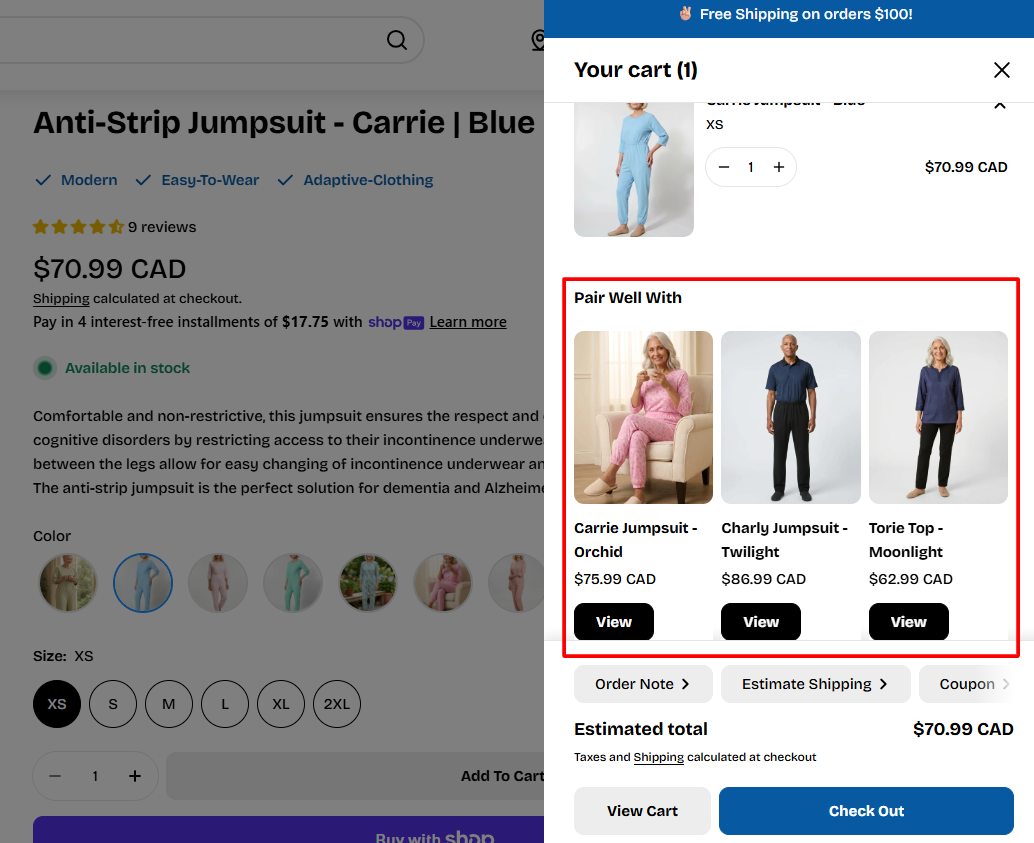
Keep these recommendations low-cost and highly relevant to the primary items in the cart. If a customer is buying a winter coat, do not recommend another heavy coat in the drawer; instead, suggest a matching $15 beanie. Ensure the recommendation includes a prominent “Add” button that instantly updates the cart total without reloading the entire webpage.
3.6. Additional Services
You do not always need physical inventory to increase your store’s average order value. You can offer high-margin add-on services right at the final stage of the cart page.
Gift wrapping is a prime example. Adding a simple toggle checkbox that allows users to add premium gift wrapping or a personalized gift card for $4.99 provides great value for holiday shoppers.
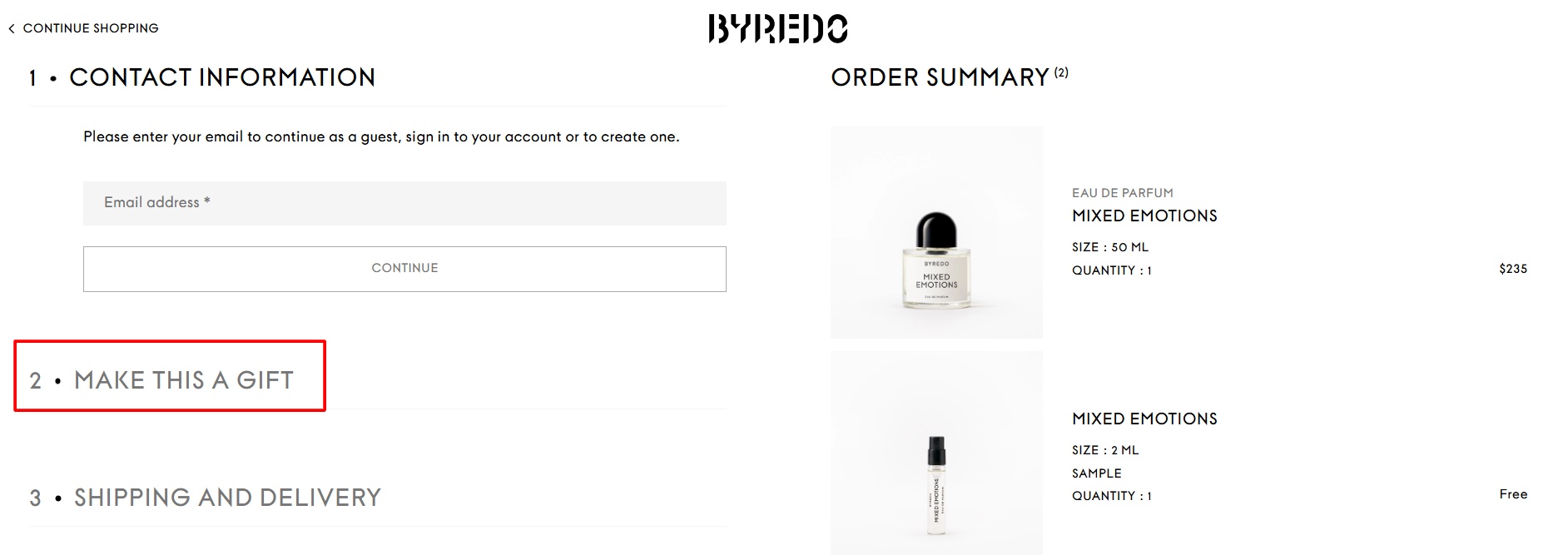
Because the raw cost of wrapping paper is minimal, nearly all of this service fee goes directly to your bottom line. You can also test adding options for extended product warranties or expedited order processing.
3.7. “Build Your Own Bundle” (BYOB) setups
Pre-made bundles are highly effective, but giving your customers the freedom to build their own custom assortments often leads to higher conversion rates. A “Build Your Own Bundle” option allows users to select their favorite flavors, colors, or styles to create a custom pack.
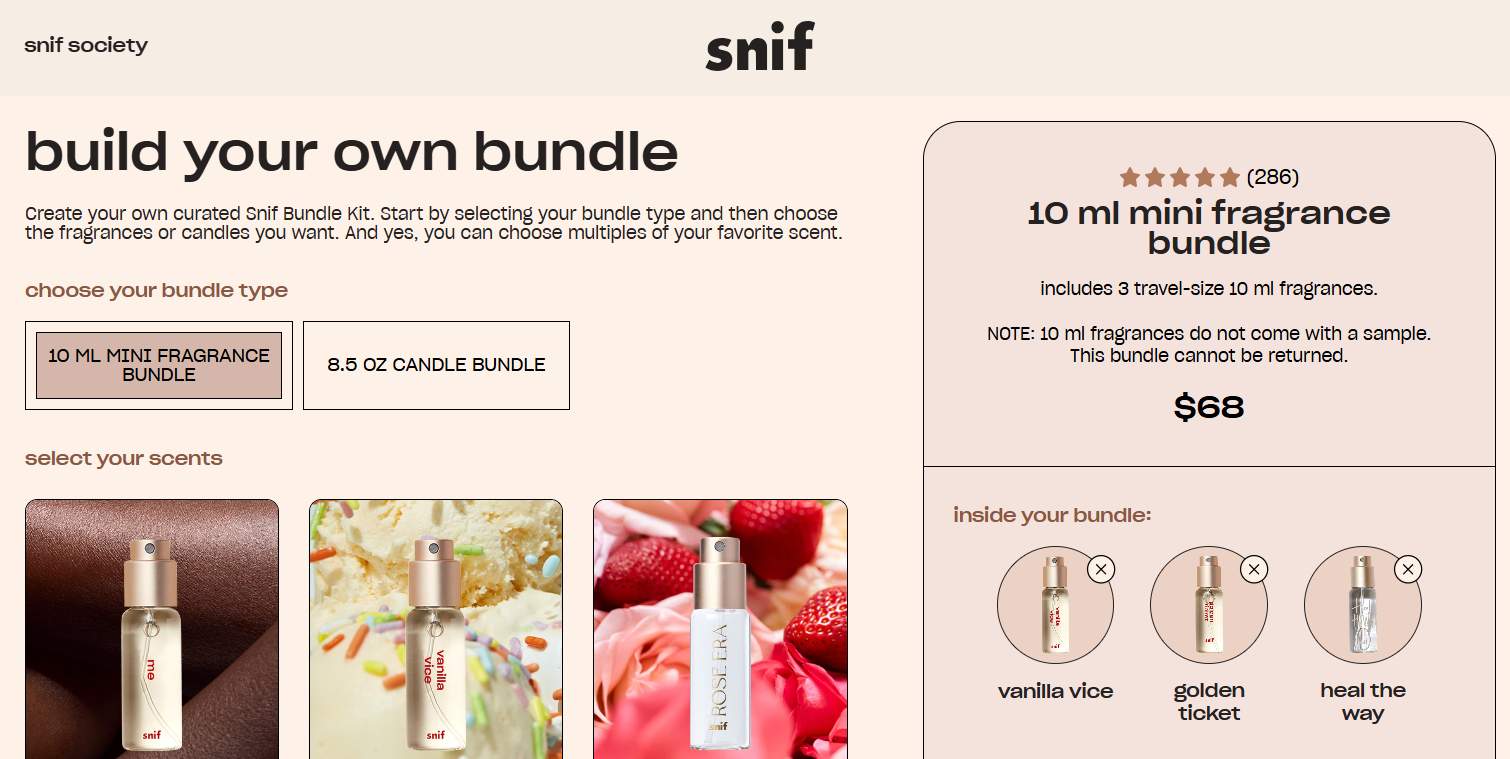
You can set a fixed price for the completed custom box or apply a scaling discount based on how many items they add. This approach increases cart sizes because customers feel completely in control of what they are receiving.
3.8. “Complete the Look” Section
This visual merchandising strategy is incredibly powerful for clothing apparel, home goods, and jewelry brands. Instead of displaying a product completely isolated on a plain background, show a high-quality lifestyle photograph of the product styled alongside matching items.
If you sell a casual summer dress, display an image of a model wearing that dress paired with a specific sun hat and a matching handbag. Directly below that photo, include a dedicated “Complete the Look” section that lets shoppers check individual boxes to add those secondary accessories directly into their cart with one click.
3.9. Integrate Buy Now, Pay Later (BNPL) Options
When an order total becomes quite high, customers often hesitate at the checkout page due to upfront price shock. Providing a flexible payment installment plan lowers this barrier and gives users the financial confidence to keep items in their cart.
Data from Shopify demonstrates that integrating Shop Pay Installments can significantly grow average order sizes, even driving a 50% increase in AOV for certain merchants. Breaking a $160 checkout into four simple, interest-free payments of $40 makes a large order feel much more accessible, preventing shoppers from removing items to save money.
4. Top Shopify apps to boost AOV
To implement these features quickly without writing custom code or hiring a software engineer, you can utilize specialized applications from the Shopify ecosystem. Here is a breakdown of highly rated choices:
- Shopify Bundles: A completely free, native tool developed by Shopify. It allows you to create simple product bundles and multipacks directly within your admin, automatically syncing your inventory to prevent overselling.
- Reconvert: A dedicated post-purchase and thank-you page optimization app. It lets you build customized post-purchase offer sequences effortlessly, catching buyers with one-click upsells immediately after they complete their order.
- NS Revenue Heatmap & Replay: A heatmap and session recording app designed to track user behavior. It provides analytics across all pages and elements, allowing you to see which section is driving the most or the least AOV.
- In Cart Upsell: A conversion-focused app that uses automated logic to recommend relevant add-ons. It displays targeted cross-sell offers directly inside the cart drawer or checkout page without disrupting the user experience.
5. Tracking your AOV and enhancing customer experience
Average order value is most powerful when analyzed alongside user behavior. To truly understand why customers leave your store without adding more to their carts, you need to look beyond standard analytics dashboards.
Using visual optimization tools like heatmaps allows you to see exactly how users interact with your upselling and bundling features.
How to leverage heatmaps for AOV growth:
- Identify dead zones: See if shoppers are completely missing your “Frequently Bought Together” sections or in-cart recommendations due to poor layout positioning.
- Track click engagement: Monitor whether buyers actually click your volume discount tables or if they ignore them because the text is too small or confusing.
- Analyze scroll depth: Discover if your “Complete the Look” suggestions are placed too low on the product page where mobile users rarely scroll.
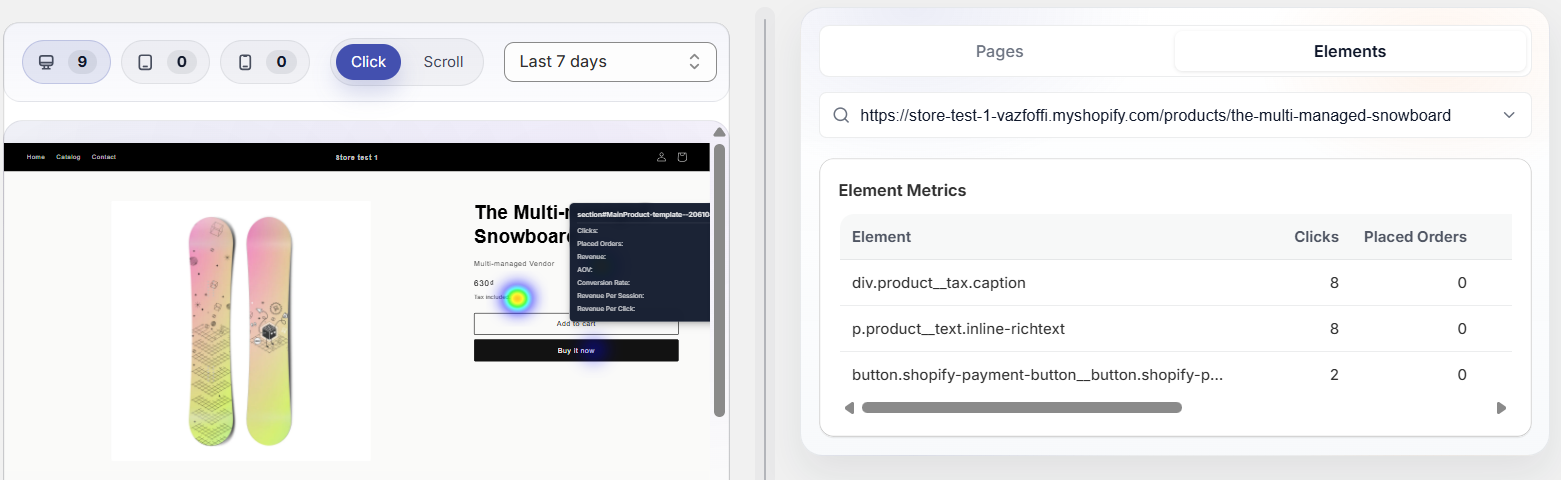
By combining financial metrics with heatmap data, you can fix friction points and naturally encourage larger orders without hurting your store’s user experience.
FAQs: Increase Shopify Average Order Value
Across all retail niches on the platform, a benchmark of $85 or more is generally considered healthy. A good average order value is typically 15% to 20% higher than your specific industry’s baseline.
However, if your store sells high-ticket items like luxury jewelry or furniture, a good target will naturally sit much higher, often exceeding $200.
Several store elements directly impact your order sizes. Your pricing model, product catalog depth, and visual merchandising choices play major roles. Additionally, user experience factors — such as displaying relevant product recommendations in the cart drawer, offering flexible payment installment options, and setting clear milestones like free shipping thresholds—directly encourage customers to add more items to their carts before checking out.
Shopify calculates and tracks this metric for you automatically. You can view it by logging into your admin dashboard, clicking on Analytics, and opening your Dashboards menu.
To better understand user behavior, you can take a step further and use heatmaps to see exactly which button or section is driving sales and AOV.