







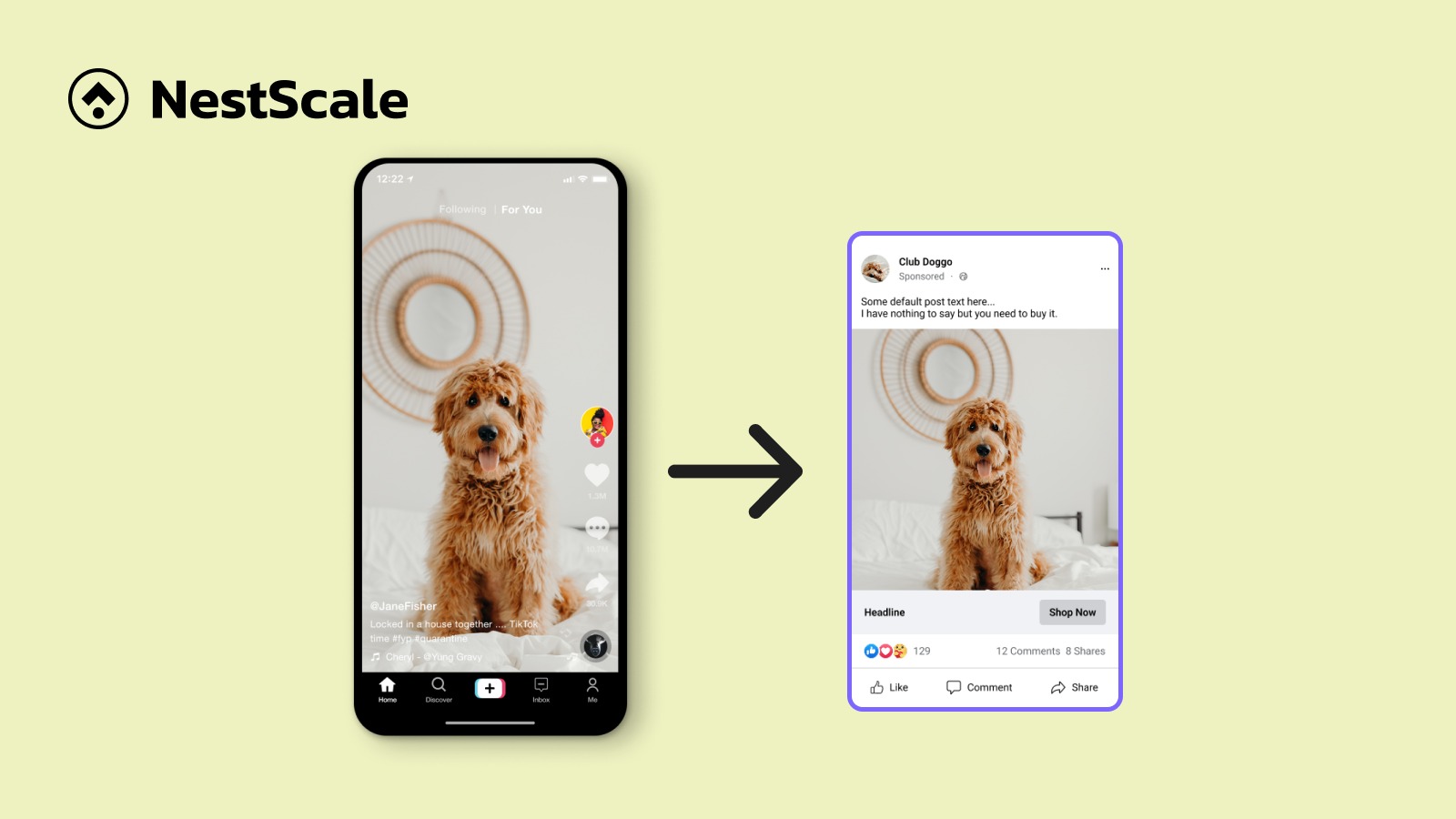
Creating great content takes significant time and effort. If you find a good idea but only publish it once, you miss out on reaching dozens of potential customers.
Content repurposing solves this problem. Instead of starting from scratch every day, you take one solid piece of work and adapt it into multiple short posts across your social media channels.
Why a good content idea should be made into different formats
Content repurposing means taking one solid asset, like a blog post or webinar, and reformatting it to fit different social platforms.
Repurposing content is different from cross-posting. Cross-posting is simply pasting the exact same link and caption onto LinkedIn, Instagram, and Facebook at the exact same time. Repurposing adjusts your message and format so it feels natural to audience on each platform.
Someone scrolling TikTok wants fast video, while someone on LinkedIn wants quick visual slides or practical text tips. Adapting your content helps you:
- Save hours of brainstorming time
- Speed up content creation for social media and keep your accounts active
- Reach a broader range of audience across platforms
Repurpose content for TikTok
#1. Clip key takeaways from long videos into short videos
If you host podcasts or have a Youtube channel, cut out the single best 30 to 60 seconds of your recording where a clear point is made. Use an interesting line right off the bat for viral hook.
Crop your horizontal video into a vertical short-form video and add big text captions across the middle. Captions can keep viewers watching longer, especially since many people scroll social media with their sound turned off.
#2. Record a quick face-to-camera video summarizing a blog post
Use your published blog posts as talking points for a quick phone clip. Hold your phone up and share the core takeaway in under a minute.
Start with a direct hook in your first sentence. Give your personal insights and encourage viewers to read the full article.
#3. Turn text posts and emails into TikTok photo carousels
Pull out the most interesting parts of your emails or blog posts and turn them into photo carousels on TikTok. You do not need to film anything on camera to make this work.
Take a three-step tip from a recent newsletter and place each step onto its own photo slide with bold text. For example, if you wrote an email about “3 Ways to Save Time on Client Invoices,” put your title on slide one, your three tips on slides two through four, and a call to action on the final slide. Add a popular song behind your slides to complete the post.
Repurpose content for Instagram
#4. Turn long videos and text posts into carousel images
Instagram carousels let you break down detailed guides into clean image slides. They work exceptionally well because users swipe through slides to read at their own pace.
Extract four to six main headings from a blog post or video script. Place one point on each graphic slide using large, clean fonts. Keep your text short so it is easy to read on mobile screens. In your caption, summarize the main lesson and remind readers to tap the save button for later.
#5. Transform long videos and text posts into Instagram Reels
Short vertical videos help you reach people who do not follow your page yet. You can take horizontal YouTube videos or blog posts and convert them into Reels.
Crop your horizontal footage to fit vertical screens, keep the speaker centered, and cut out slow pauses to keep the pacing fast. If you do not want to talk on camera, record a quick voiceover explaining your main text tips while showing background video of your workspace.
#6. Reuse popular quotes and stats as feed graphics and Stories
Every well-researched guide contains standout statistics or punchy quotes. These short snippets make quick single-image posts.
Place a single stat onto a clean background graphic featuring your brand logo. Share the image to your main feed, then post it to your Stories with a poll sticker asking your followers if they agree with the statistic.
Repurpose content for YouTube
#7. Cut long videos or podcasts into YouTube Shorts
YouTube Shorts are vertical videos under 60 seconds that show up in mobile feeds, helping you gain new subscribers quickly.
Find the most exciting moments from your long uploads and trim them into short clips. You can link your Short directly back to your full YouTube video inside YouTube Studio, sending interested viewers straight to your main channel content.
#8. Turn blog posts into video scripts
If you have a blog, especially with good traffic, you already have a dozen of full video scripts ready to go.
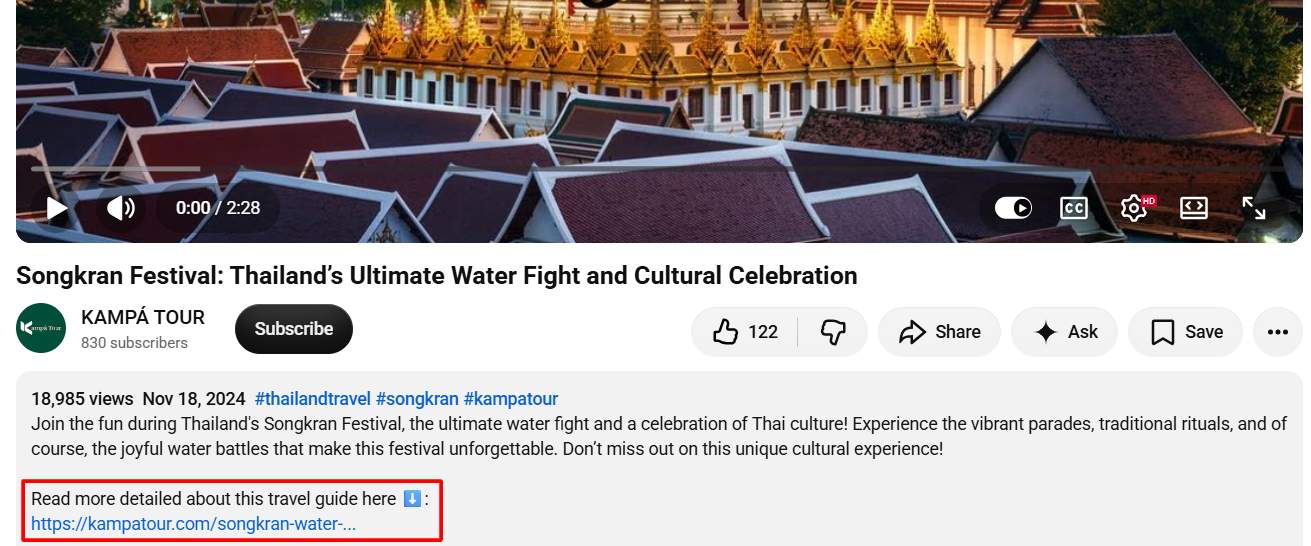
From my experience, video scripts should have fewer words than the articles since you can use actual images and sounds for illustration. Write out a simple outline, and make a 3-minute video with AI voiceover if you prefer.
In the description, you can link to the full article.
#9. Post key moments and memes on YouTube Community posts
You can keep your YouTube channel active without filming a new video every week. The Community tab lets you post text, images, and polls directly to your subscribers’ feeds.
Polls and memes are two most popular types of Youtube community posts. For example, Duolingo turns their TikTok videos into meme with a short caption:

Repurpose content for Facebook
#10. Rewrite long-form articles into Facebook posts
Facebook users prefer conversational posts over plain website links. Pasting an article link by itself usually yields low reach because the platform prefers native text.
Take the main takeaway from your article and write it like a quick email to a friend. Start with a personal story or a real problem you solved. Share your tips using short paragraphs, and place your article link in the first comment rather than the main post text.
#11. Clips highlights from long videos for Reels
If you record Facebook Live sessions or client Q&As, pull out one-minute clips to share as Facebook Reels.
Add captions directly onto the video so mobile viewers scrolling quietly can still follow along. Keep the video focused on solving one practical problem, and invite people to follow your page for additional daily tips.
#12. Turn articles into Facebook Group questions
Posting sales links in Facebook Groups usually gets ignored. Instead, take a main point from your article and turn it into an open question.
For example, if you wrote a blog post comparing paid ads to organic social media, ask the group: “If you had a $500 marketing budget this month, would you spend it on ads or content creation?” Reply to the comments with helpful tips from your article to build trust with potential clients.
How to choose good content for repurposing
Look for top-performing posts that already have high traffic
Do not guess which posts to re-make. Look at your website analytics or social media insights to find your top 10% most popular posts over the past six months.
If a blog post or video performed well in the past, your audience has already proven they care about the topic. Re-making that proven asset into new formats gives you a high chance of success.
Focus on evergreen topics that stay relevant over time
Evergreen content covers basic how-to tips, foundational advice, and practical guides that remain useful for years. News updates and short-lived trends go out of date quickly.
Focusing your energy on evergreen topics ensures that your social graphics, short clips, and summary posts stay helpful long after you publish them.
Pick content that answers common customer questions
Review your customer support emails, sales notes, and client inquiries. Content that directly answers prospective client questions makes exceptional material for social posts.
When you turn a common customer objection or setup question into a short video or carousel post, you help your audience solve real problems while saving your sales team time during future calls.
Best content repurposing tools (free & paid)
Using simple tools helps you edit and reformat your work in half the time:
- Canva (Available for free): Best for turning quotes, stats, and text summaries into clean carousel graphics and social images.
- CapCut (Available for free): An easy editor for phone and desktop that adds automatic captions and crops horizontal videos into vertical clips.
- Descript (Available for free): An audio and video editor that generates editable text transcripts. You can cut video clips by simply highlighting and deleting text on your screen.
- ChatGPT or Claude (Available for free): Useful AI tools for content repurposing.
- Hootsuite (Pay for a complete feature stack): Social media tools that let you schedule your repurposed posts across multiple accounts weeks in advance.
FAQs about Repurposing content for social media
Content repurposing (or content recycling) is the practice of taking existing content and reformatting it to serve new audiences, platforms, or goals. This strategy maximizes the value of a content idea and saves production time.
No, sharing your idea across social media channels will not hurt your search engine rankings. Social media platforms treat posts as separate media assets. Reformatting your written blog text into short videos or image slides is completely safe.
Most social media algorithms only show your posts to a small of your followers. You can easily share the same core message every two to three months by changing the visual format or using a new headline hook. If enough time has passed and the content is evergreen, you can even reshare and repost.
AI tools can help you draft outlines or summarize long text quickly, but human review is essential. Use AI tools to create initial post drafts or video summaries, then edit the text yourself to add your personal voice and real business experience before sharing.