







Getting sales on TikTok comes down to making the buying process as fast as possible. When a viewer has to leave your video to click a link in your bio, or leave the app to search Google, most of them lose interest and scroll away. TikTok shoppable videos fix this issue by letting people buy products directly inside the app while watching your content.
In this guide, you will learn how to set up shoppable videos, structure your content to convert, and fix common mistakes that hurt your sales.
What are TikTok shoppable videos?
TikTok shoppable videos allow creators and business owners to tag products directly inside short-form videos. Viewers can tap the yellow product icon appears above your caption, which opens a quick product page where the viewer can purchase quickly and easily.
This significantly reduces the customer journey on social media, helping you convert more impulse buyers. Instead of saving a video for later or planning to look up an item, viewers can complete a purchase in under thirty seconds.

Four reasons why shoppable videos help increase sales
Shoppable videos reduce friction and turn casual viewers into instant buyers. Here are 4 key reasons why this format drives higher sales:
- Zero exit friction: Viewers buy directly inside the app without leaving their feed or waiting for external websites to load.
- Capture impulse purchases: According to TikTok, 50% of users watch content and shop on TikTok at the same time, while 89% have bought products based on app content. Shoppable videos simply cater to customer demands.
- Lower cart abandonment: Fewer steps between product discovery and checkout mean fewer shoppers drop off before paying.
- Instant product proof: Seeing a real demonstration builds immediate trust, so viewers feel confident buying right away.
Account requirements for TikTok shoppable features
Before you start tagging products, your account must meet TikTok eligibility rules. Requirements vary depending on whether you sell your own inventory or promote items as an affiliate creator.
To register as a store owner selling your own products:
- Register through the TikTok Shop Seller Center.
- Provide a government-issued ID or official company registration documents.
- Submit local tax information and a valid bank account for payouts.
- Operate within a supported region, such as the US, UK, or supported Asian markets.
To apply as an affiliate creator promoting third-party products:
- Be at least 18 years old.
- Maintain an active account in good standing with no major policy strikes.
- Meet the follower minimum for your country (typically 1,000 to 5,000 followers).
- Enroll directly through the TikTok Shop Affiliate hub inside the app.
If you already have shoppable features, you can follow the tutorial on how to add a product link to TikTok videos.
Five best practices for TikTok shoppable videos
High-converting shoppable videos usually follow a simple, three-part structure: a fast hook, a clear product demonstration, and a direct call to action. Here are some best practices for shoppable videos on TikTok, and how you create effective content for social commerce:
1. Grab attention in the first three seconds
The opening three seconds decide whether someone watches your video or swipes away. You need a clear reason for people to stop scrolling.
Lead with a relatable problem, an interesting visual result, or a bold statement. Here are a few quick examples that work well:
“If you deal with frizzy hair in the morning, watch this.”
“Three ways I style this oversized jacket for work.”
“Stop wasting money on paper towels.”
Adding good video hooks should make the right viewer feel like the video was made specifically to solve their problems.
2. Show product value and real results
After your hook, spend ten to fifteen seconds showing what the product does in real life. Focus on showing the item in action rather than listing technical features.
If you sell a kitchen gadget, show it chopping vegetables in real time. If you sell a clothing item, show how it fits, how the fabric moves, and how you style it. Address common concerns naturally while showing the item. Mention how long the battery lasts, how easy it is to clean, or how soft the material feels.
This clear visual proof overcomes doubt and moves potential buyers much closer to making a decision.
3. Add a clear call to action
Never assume viewers will figure out how to buy on their own. You need to tell them where to click before the video ends.
In the last five seconds of your video, direct viewers to the bottom of the screen. State clearly what they need to do, such as: “You can grab this exact mug by tapping the yellow cart below.”
At the same time, point your finger toward the bottom left corner of the video where the yellow product anchor sits, or add on-screen text that says “Tap the yellow cart to order.”
4. Choose high-converting formats
Structuring your content around proven formats helps your video feel natural in the feed rather than forced. Three main styles work exceptionally well:
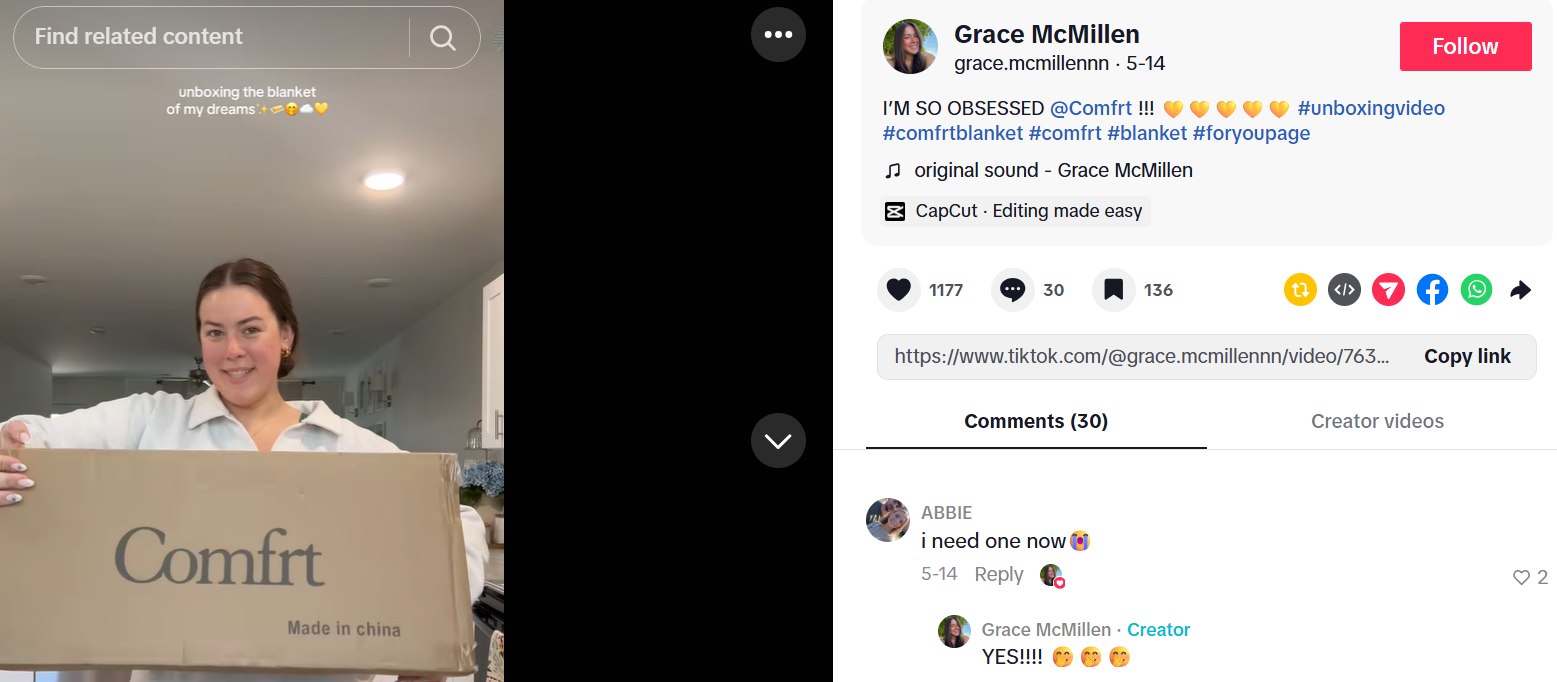
- Unboxing videos: Opening a product on camera creates excitement and shows viewers exactly what they will receive.
- Problem and solution videos: Demonstrating a common daily frustration followed by the fix makes the product’s usefulness obvious.
- Routine videos: Integrating the item into a daily process helps viewers picture how it fits into their own lives.
Using these proven TikTok content ideas for businesses makes your clip feel like a helpful recommendation, which keeps purchase intent high.
5. Working with creators
You can send free samples to creators who post about your product for an affiliate fee.
Creating videos yourself gives you full control over how your product is presented. However, making multiple videos every week takes time.
Working with affiliate creators helps you scale up your video output fast. When creators post about your product on their accounts, you get access to their followers and build social proof through different voices and video styles.
In case you are a creator, you can learn how to do affiliate marketing on TikTok with our detailed guide.
How to measure shoppable videos performance
Tracking your results helps you understand what content works and where you are losing customers. TikTok provides clear sales metrics inside your account dashboard.
Focus on three key TikTok metrics when reviewing your video analytics:
- Hook rate (3-second view rate): This percentage shows how many viewers watched past the first two seconds. A low hook rate means your opening visual or line needs to be more engaging.
- Product link click-through rate (CTR): This shows the percentage of viewers who tapped your yellow product tag. If people watch your video but do not click, your product demonstration or call to action was not strong enough.
- Conversion rate and total sales: This shows how many link clicks turned into completed orders.
Fixing TikTok shoppable videos that do not perform well
When a video gets high view counts but no sales, use your metrics to identify the problem instead of deleting the clip.
Sorting through these performance numbers manually across multiple videos can quickly become overwhelming. Using a dedicated TikTok analytics tool simplifies this entire process. NestAds automatically analyzes your video creatives and tracks your essential metrics in one dashboard. Having automated creative insights lets you fix underperforming videos faster and scale your top-performing shoppable videos.
FAQs about TikTok shoppable videos
Viewers tap the yellow product link on the screen to open a pop-up checkout menu. From there, they select their options and finish the purchase using saved shipping and payment details in just a few taps.
No, TikTok does not allow you to add or edit product links on a video once it is published. If you forget to attach the link, you must re-upload the video and tag the item on the final posting screen.
Check your video analytics to find where viewers drop off. If your link clicks are low, make your product demonstration clearer and tell viewers explicitly to tap the yellow cart; if clicks are high but sales are low, optimize your pricing and product page details.