







 Google Advertising
Even though Google’s auction has gone through some changes, one thing stays the same, keyword research is a must for any Google Ads campaign.
In recent years, users tend to be more particular in their search queries, with longer and more specific phrases. And, Google has changed the way keyword match types work to understand the meaning rather than just catching a phrase. Thus, we need a more effective method to adapt to these shifts.
So how to execute Google Ads keyword research more effectively in 2026? Let’s discuss more, we’re going to give you some fresh insights into this topic, packed with actionable tutorials & tips so that you can optimize your ad campaigns more efficiently.
💡 Key Takeaways
- Is keyword research still relevant for Google Ads in 2026? It is absolutely still relevant, but its purpose has changed. Keyword research is no longer about building massive spreadsheets of exact-match spelling variations. Instead, it is about deeply understanding buyer intent.
- How has the shift to AI and automation changed how keywords match to ads? Google’s AI now prioritizes semantic intent over syntax. Because match types have loosened significantly — even “Exact Match” behaves semantically to capture synonyms — advertisers now lean into Broad Match combined with Smart Bidding and audience signals.
- How do I do Google Ads keyword research “the right way” in 2026? The key steps haven’t changed, just the way you execute them. Focus on intent and first-party data. Use AI to mine your actual customer touchpoints — like sales transcripts, customer service logs — for natural-language phrases.
Fundamentals of Google Ads keyword research
First, if this is your very first time doing keyword research for Google Ads, here are a few things you need to understand.
Why you must nail keyword research for Google Ads (even in 2026)
Google Ads, at its nature, operates on the principle of search intent.
Even with Google’s massive shift toward automation, neglecting keyword research will make your campaigns vague, inefficient, and expensive. Here is why it remains a critical pillar:
- It’s the “starting signal” for Google’s AI: Google’s machine learning is powerful, but it cannot optimize what it does not understand. Your keyword list serves as raw market research and the foundational “seed signal” that tells the algorithm who your audience is and what you sell.
- Capturing “AI Mode” searches: With over half of users regularly utilizing conversational search and AI Overviews, search queries are much longer, highly descriptive, and question-based. Keyword research helps you map out these user intent themes rather than just looking for short, isolated strings.
- Negative keyword control: You might not have to manually bid on every spelling variation anymore, but you absolutely still need to do research to find negative keywords. This is the single best way to prevent Google’s broad match from wasting your budget on irrelevant, non-converting search terms.
- Aligning with search intent: As highlighted in the draft you are editing, Google Ads operates on the principle of search intent. Nailing keyword research ensures you are separating informational queries (users just browsing) from transactional intent (users ready to buy), allowing you to optimize your Google Ads budget to drive ROI.
How do Google Ads keyword match types operate?
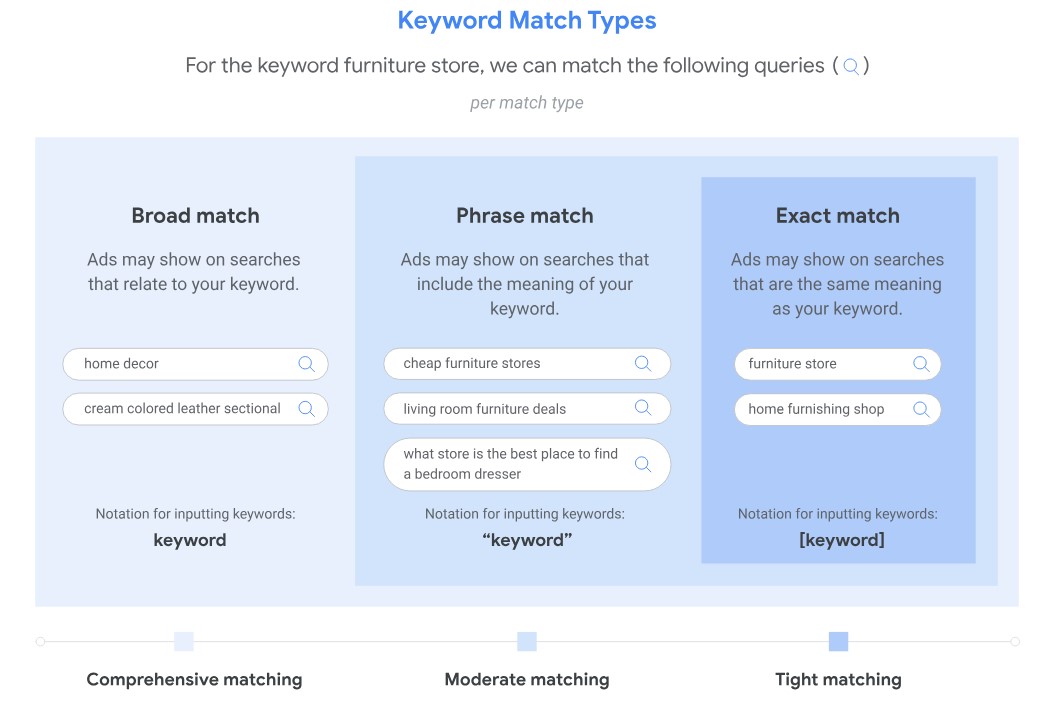
To determine how closely a user’s search query must match your keyword for your ad to appear, Google Ads have 3 main keyword match types:
Exact Match
Your ad will only show when the search query is an exact match to your keyword, including capitalization, punctuation, and word order.
- Keyword format: [Keyword]
- Example: If your keyword is “[running shoes],” your ad will only show for searches like “running shoes”.
Phrase Match
Your ad will show when the search query contains your keyword as a complete phrase, with any additional words before or after it.
- Keyword format: “Keyword”
- Example: If your keyword is “best running shoes,” your ad might show for searches like “best running shoes for men” or “where to buy best running shoes”.
Broad Match
Your ad may show for search queries that are related to your keyword, including synonyms, singular/plural forms, and misspellings.
- Keyword format: Keyword
- Example: If your keyword is “running shoes,” your ad might show for searches like “athletic shoes,” “jogging shoes,” or “running shoes”.
To dive deeper, you can check out our blog for a detailed Google Ads keyword match types explanation with practical tips for targeting.
How to do keyword research in Google Ads in 2026
In this section, we’ll guide you step-by-step through the process of conducting Google Ads keyword research. While there are many tools available to help with this task, in this guide, we’ll primarily focus on using Google Ads Keyword Planner — a free tool that comes with your account. Here are the main stages of Google Ads keyword research:
- Discover new keywords
- Refine your keyword list
- Select most suitable keywords
- Organize keyword list
- Frequently analyze keyword performance
1. Discover new keywords
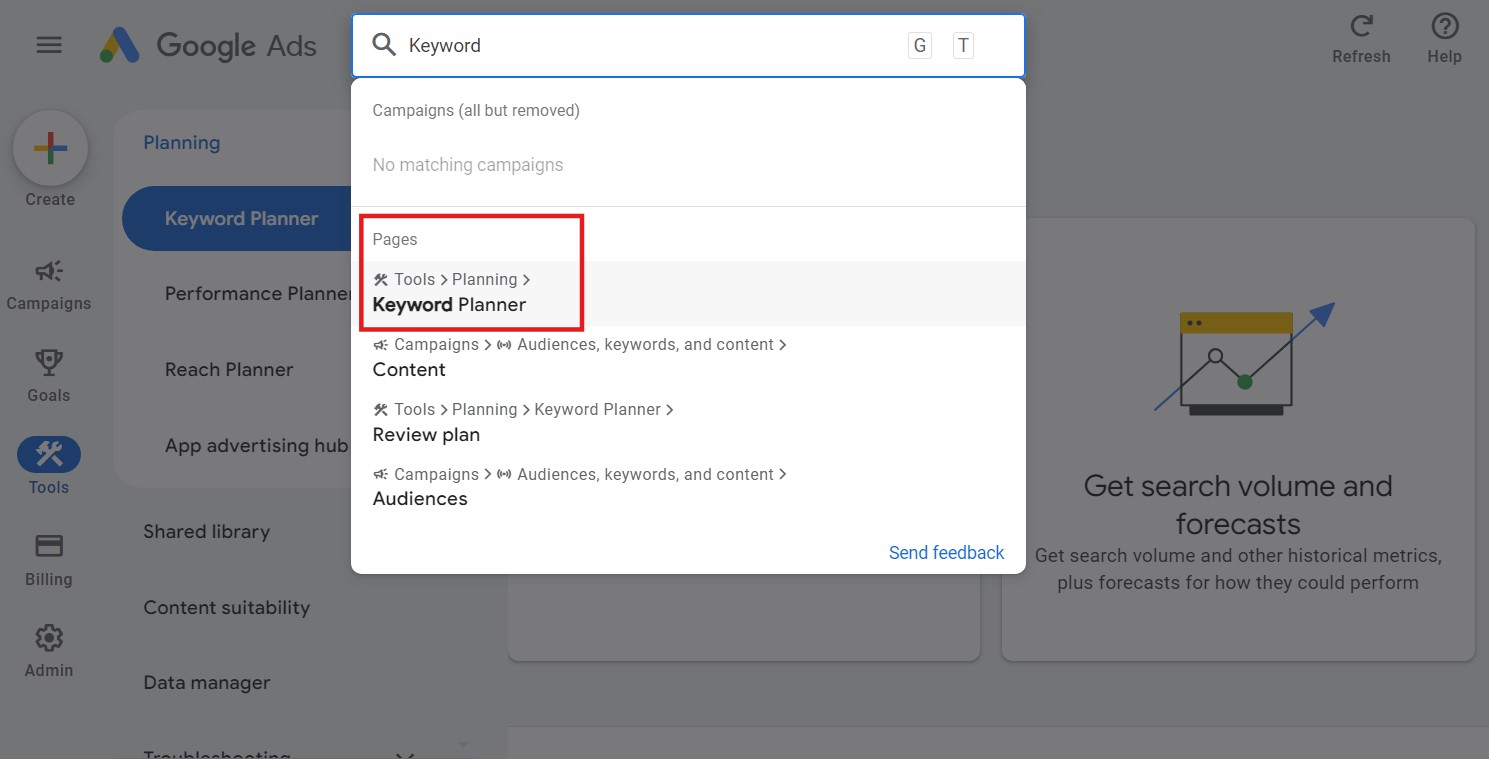
Step 1. In Google Ads, you can use the search bar to search for Keyword Planner or access it in the tools section.
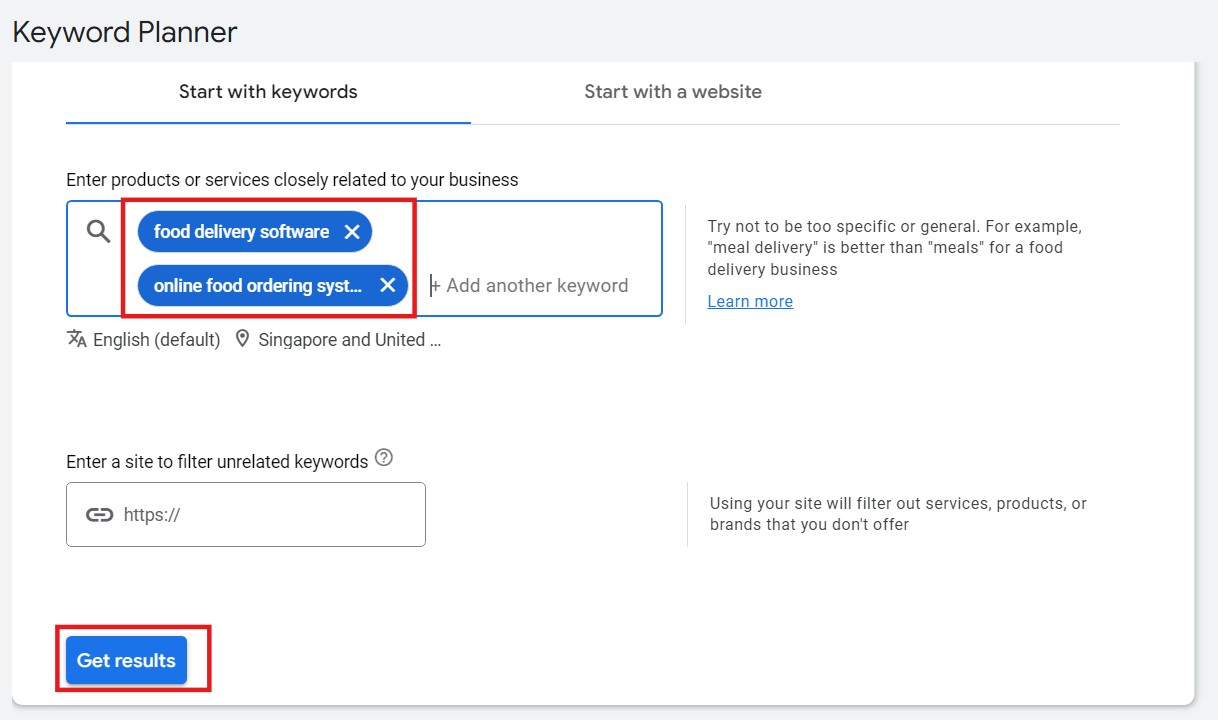
Step 2. Next, click on Discover new keywords. For this example, we’ll input keywords such as “food delivery software” and “online food ordering system”, and click Get results.
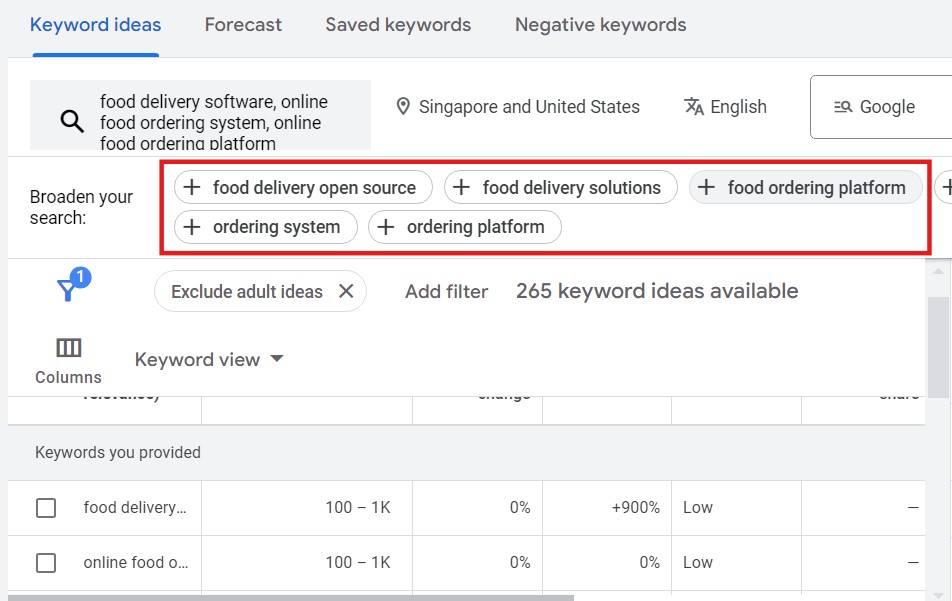
Google will start to give you different recommendations. We’ll go over and explore more related keywords that people are actively searching for. This can help you broaden your campaign’s reach. Please note that you can initially add up to 10 different keywords.
💡Make the most of AI tools: For Google Ads keyword research, AI tools such as ChatGPT or Gemini could be your powerful assistant. You can input your seed keywords (the main keywords related to your product or service), and then ask these AI tools to suggest additional relevant keyword ideas. Besides, you can also tell AI to generate long-tail keywords, which are more specific and often less competitive.
After gathering fresh ideas from AI, you should double-check these keywords in Google Keyword Planner to see their search volume, competition, and CPC (Cost-Per-Click) before adding them to your campaign.
2. Refine your keyword list
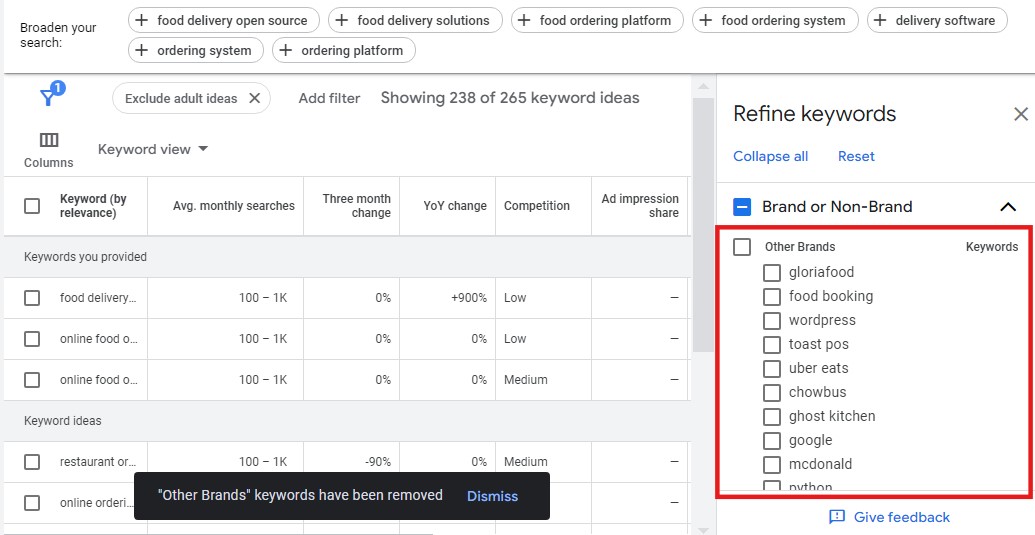
Step 3. On the right, you’ll see Refine keywords bar. We suggest excluding all the brand-related terms to focus on non-branded traffic. Thus, you can get rid of unnecessary or irrelevant terms, to keep your ads targeting the right audience who are not specifically searching for a competitor’s brand.
Depending on your search terms, Google will also suggest including related or similar search themes. But in this case, none of the suggestions are relevant so we’ll exclude them.
Step 4. You can also Add filters for keywords.
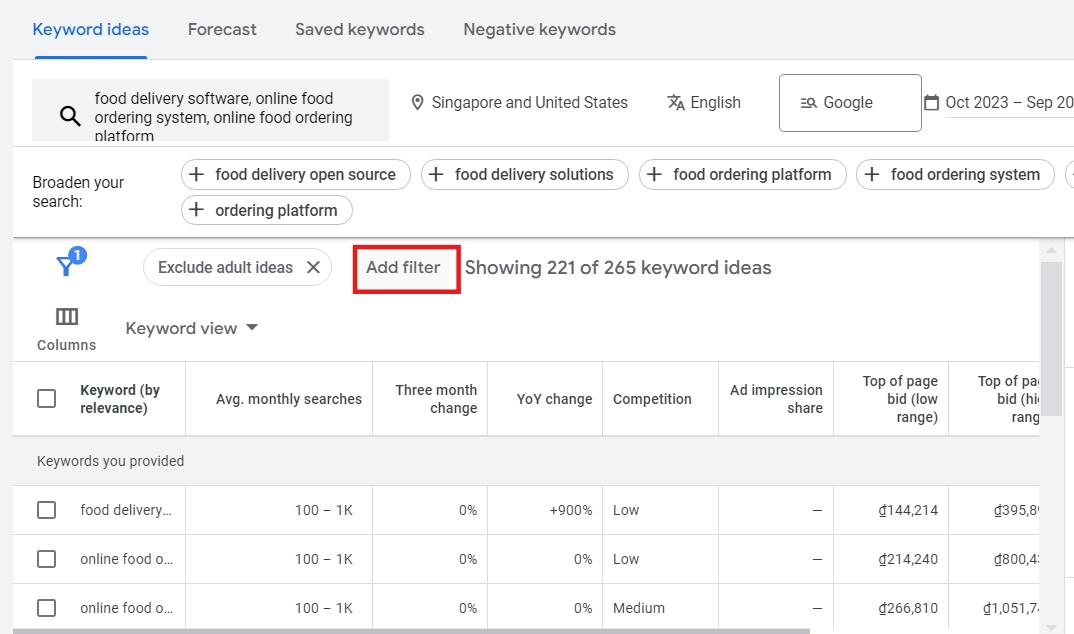
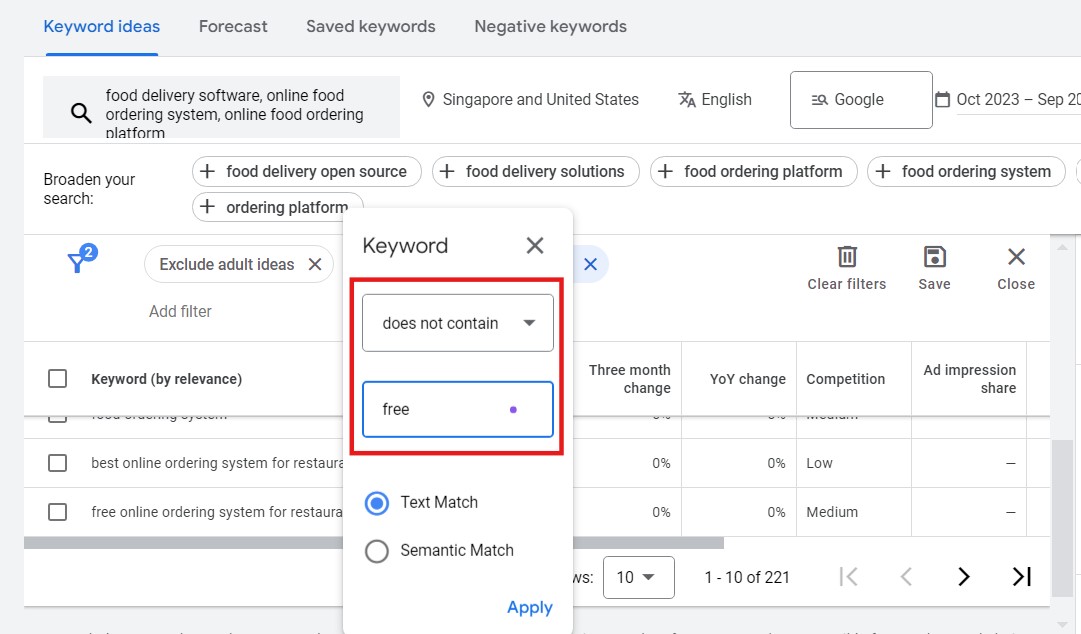
For example, you can filter out terms that contain “free” by adding a keyword filter. You can also refine keywords further by removing specific words like “software” if needed.
Filters allow you to refine your keyword list without manually checking every entry. This saves time and keeps you focused on targeting valuable keywords.
3. Go through & select keywords
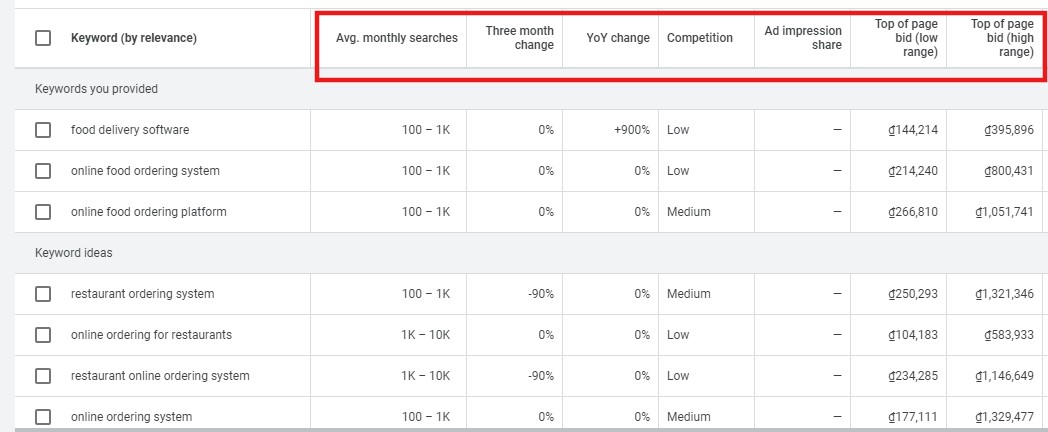
Step 5. Here you can see data like average monthly searches, three-month and year-on-year (YoY) change, competition, and bid information. If you’re unsure what any data point means, hover over the table, and Google will provide you with explanations.
💡Targeting “intent density” over search volume: With zero-click searches accounting for nearly 68% of Google queries, chasing high-volume, top-of-funnel keywords (like “how to fix a leaky pipe”) is an easy way to burn through your budget. AI Overviews answer these questions immediately, stripping away the need for searchers to click on ads. You should instead focus on queries that signal a transactional need (like “pipe repair tools”).
Here are 4 major types of search intent that you should understand when curating a keyword list:
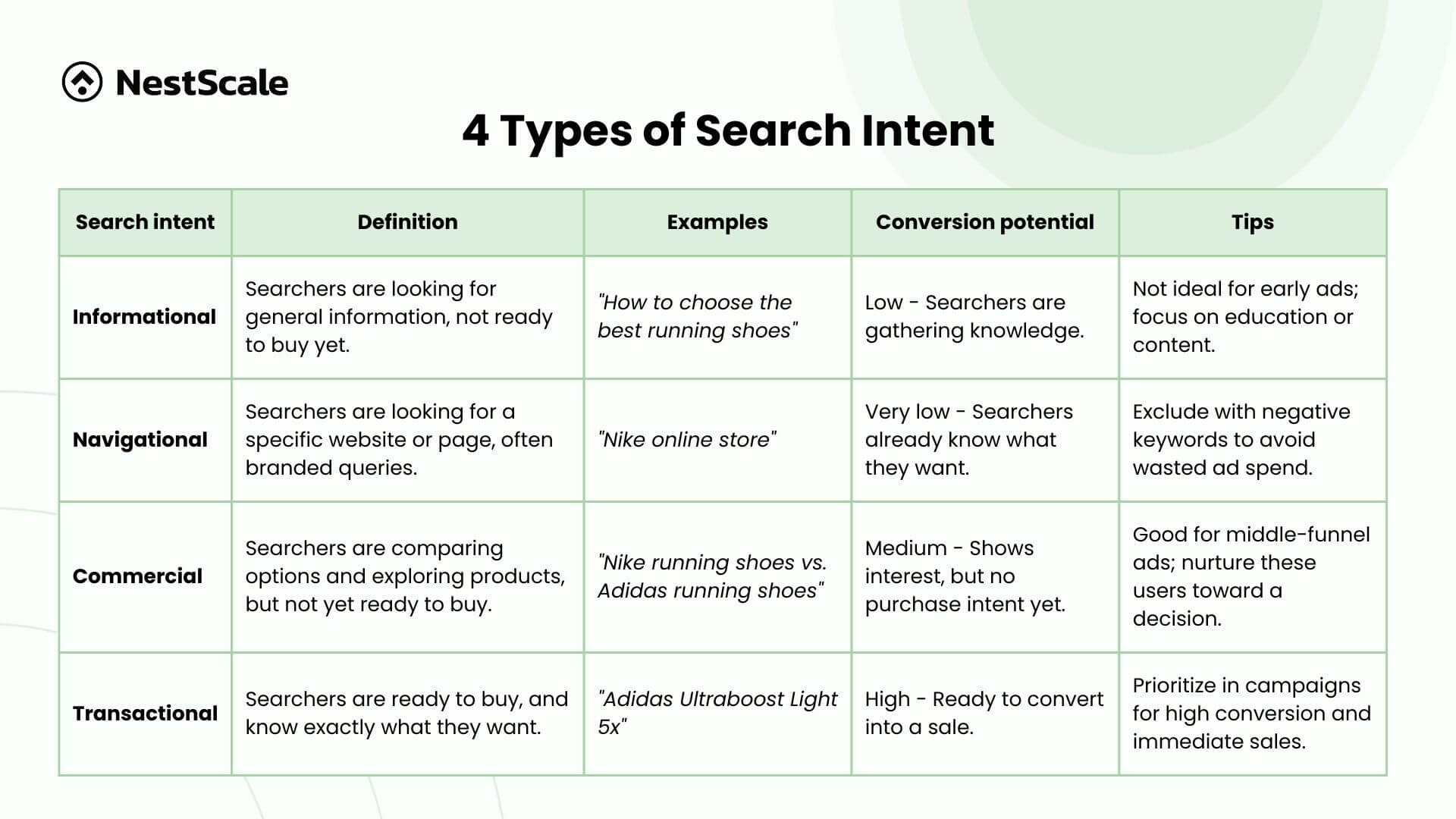
Step 6. When using Google’s keyword targeting, you should look for 2 – 3 broad match keywords to start with. Also, review the Keyword ideas to identify any exact match keywords that could be useful.
In this case, we’ve found additional keywords like “online ordering for restaurants” and “restaurant online ordering system” which are good to include.
What matters is to choose several other keywords that you think they’re relevant to your product or services that you want to advertise.
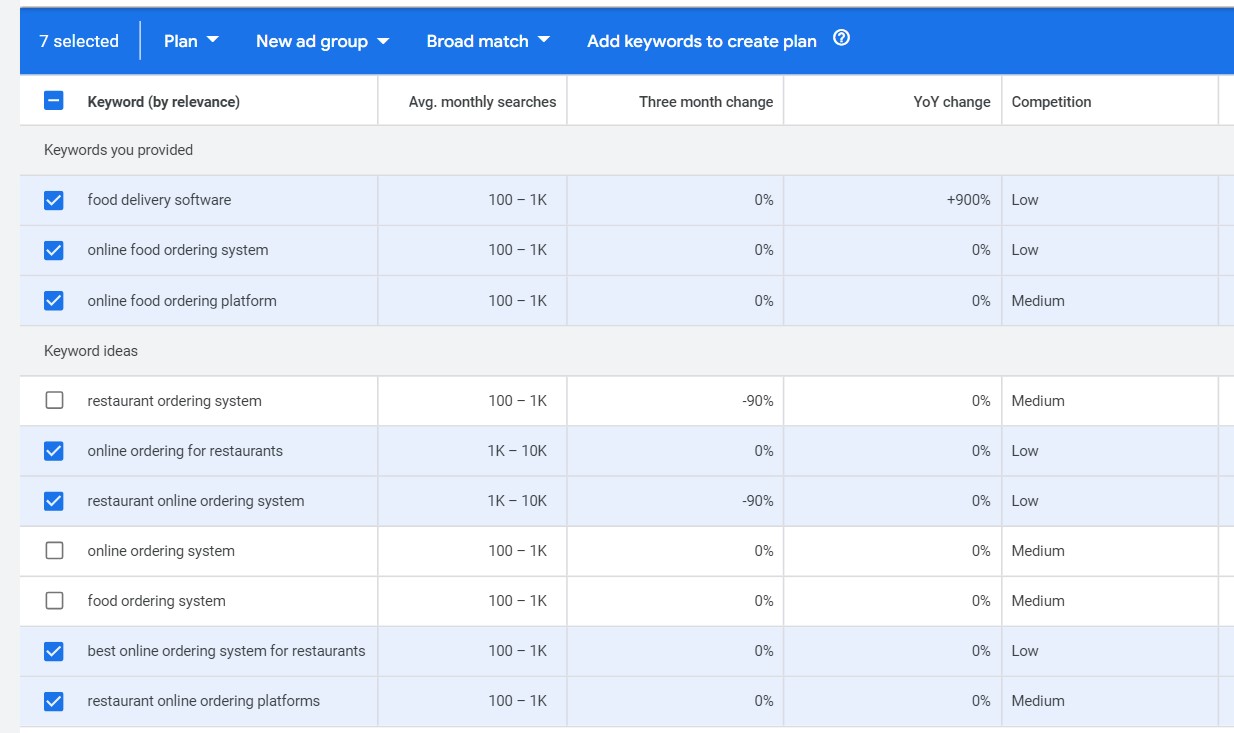
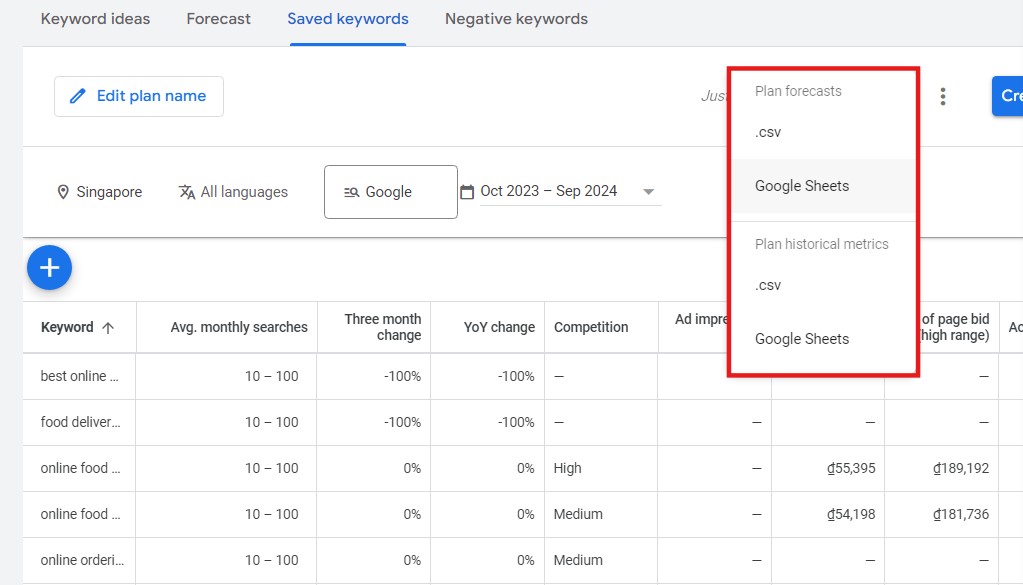
Step 7. Once you’ve selected your keywords, you can click Add keywords to create plan to save your keywords.
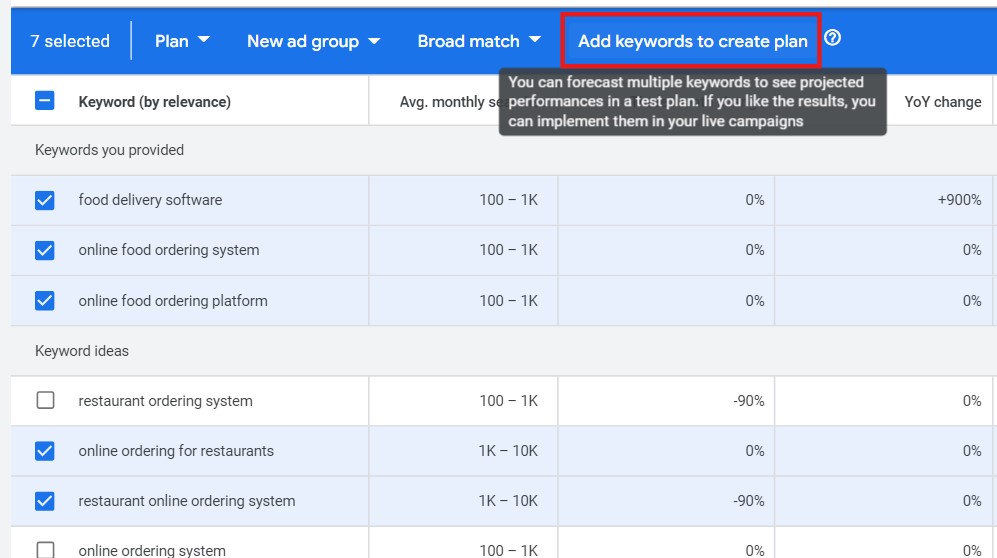
Then, click View saved keywords.
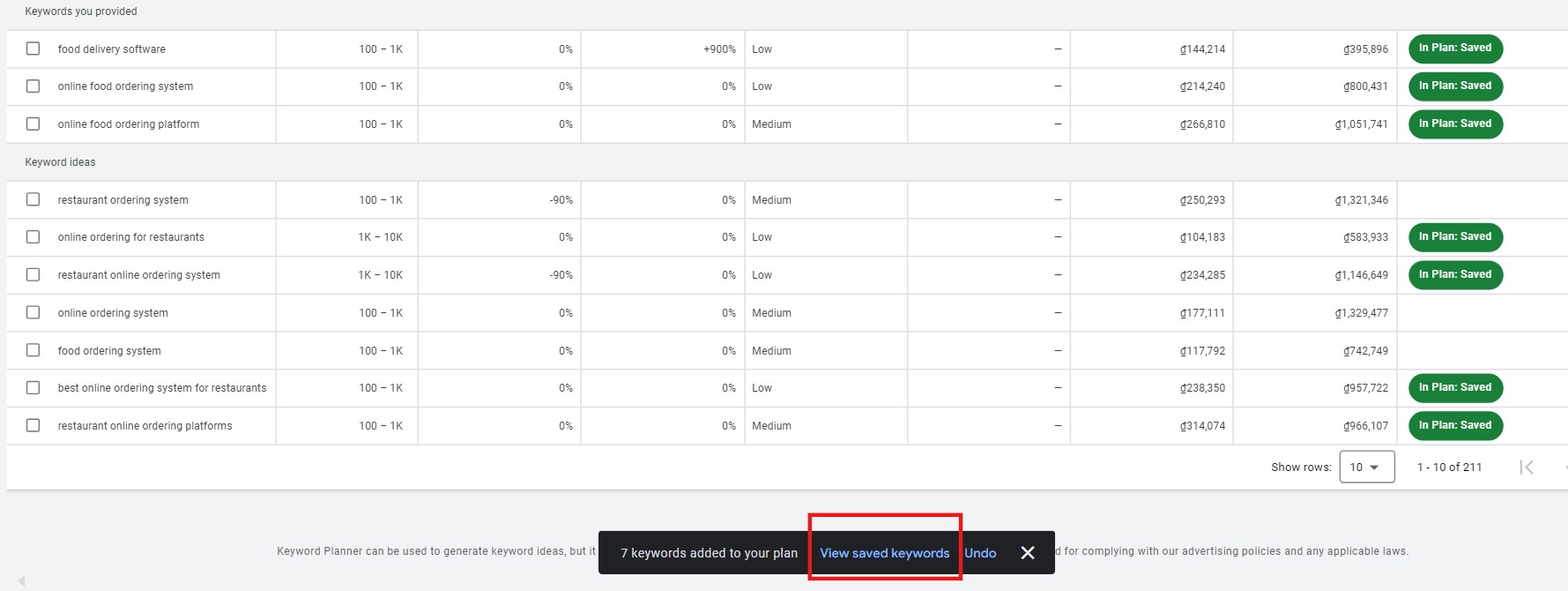
Step 8. If the keyword list is all good, you can download the list into a Google sheet or CSV file. We typically prefer Google Sheets to keep everything online.
4. Organize your keyword list
Step 9. After downloading and opening the sheet, we’ll clean up the data and organize it into Campaigns & Ad groups. Now, we’ll break it into 3 ad groups: food delivery, online food ordering, and restaurant online ordering.
When setting keywords to run your campaign, longer keywords like “best online ordering system for restaurants” can be used as broad match keywords. For some of the “online food ordering” group, we would keep them as broad match. But for “restaurant online ordering”, because we have more keywords, so we would probably add 2 as a broad match and 2 as exact match.
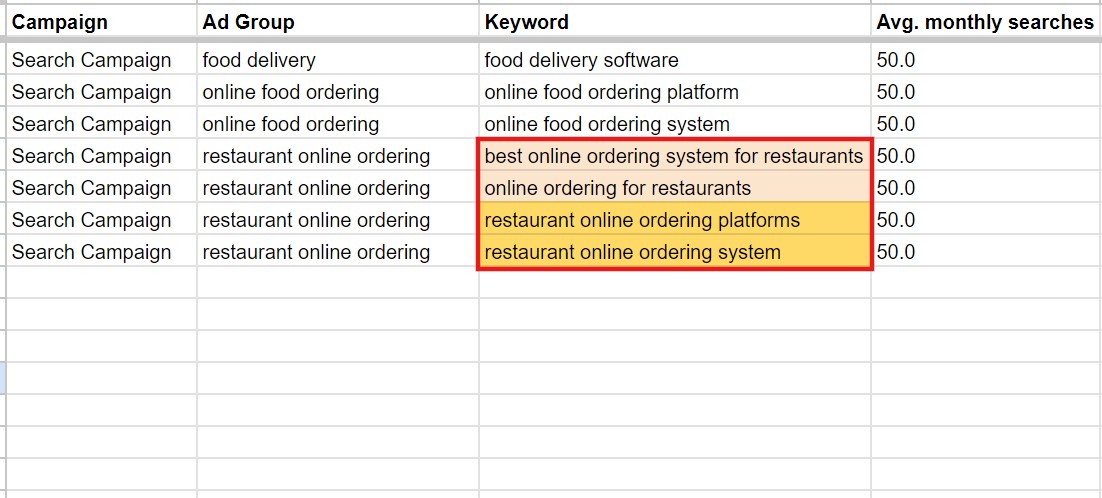
When doing so, sometimes some keywords may have a low search volume warning. Actually, it’s not a serious issue in a broad match setting because Google doesn’t have the data yet. And we’re focusing on the meaning, so it would be fine.
Over the first 7 days of running your campaign, you should start building exact match keywords based on your search term audits.
From the Search terms report, you can do two important things: add negative keywords (terms you don’t want to show up for) and create new exact match keywords based on real search queries. This is a much quicker but also a more profitable way to complete your keyword research.
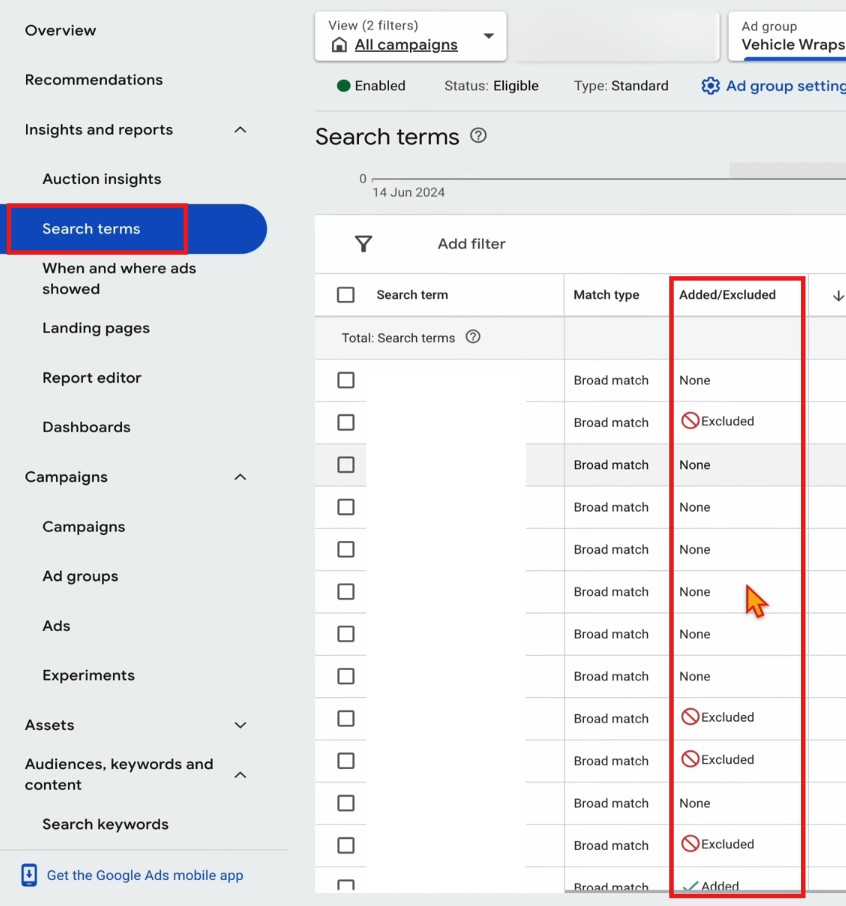
*Pro tip: Using two-word broad match keywords can lead to irrelevant traffic. Instead, you should conduct regular search term audits to find and exclude useless terms, thus keeping your campaign on track.
5. Frequently analyze your keyword performance
The best way to determine what works for you is through regular monitoring and testing. As you run your campaigns, set a schedule to frequently analyze your keywords to see if they’re driving the desired results, such as conversions, clicks, and revenue.
We recommend regularly reviewing your keyword performance directly in Google Ads. If you’re unsure how to do this, refer to this Google’s guide. However, keep in mind that keyword data only tells part of the story.
If your campaign isn’t performing well, don’t just rely on keyword reports. Keyword data provides only a part of the picture, there are other Google Ads Metrics & KPIs to look for. Using a marketing attribution tool can help you get a fuller view of how your keywords contribute to conversions across multiple touchpoints and platforms.
If you’re running ads on Google, Facebook, and TikTok, NestAds can help you see how interactions on one platform may lead to conversions on another. A keyword might lead to a click on Google, but the actual conversion could happen after a user sees a Facebook ad. Attribution tools can reveal this kind of cross-channel behavior, giving you a more complete understanding of your marketing impact.
Get started for free or book a demo to see how NestAds help you scale Google Ads performance.
FAQs: Google Ads keyword research
To find new keywords in Google Ads, start with the Google Keyword Planner by entering seed terms or your competitor’s URL to generate automated suggestions. Additionally, leverage Broad Match combined with Smart Bidding in a test campaign; this acts as an AI-powered discovery engine, capturing real-time conversational queries you might not think of.
Keyword research is not a one-time setup event; it is done before and after launching any new campaign, product, or service. You should also perform routine maintenance weekly or monthly by auditing your Search Terms Report. This helps you discover new high-performing queries to target and negative keywords to exclude.
The primary place to find actual user queries is the Search Terms Report directly inside your Google Ads dashboard. This shows exactly what people typed before clicking your ads. For external discovery, check Google Search Console to see organic queries driving traffic, and use Google Trends to spot breakout search patterns.
To find the right keywords, align your choices with search intent rather than just chasing high search volumes. Categorize keywords into informational, consideration, or transactional buckets, prioritizing high-intent terms like “buy” or “near me” for direct conversions. Ensure tight relevance: the chosen keywords must match the exact context of your ad copy and the landing page to secure a high Quality Score and lower your advertising costs.
The best tools blend raw search volume data with modern competitive intelligence. Google Keyword Planner remains the essential, free starting point for accurate search volume and bid estimates. For deeper competitor mapping, Semrush and Ahrefs are industry leaders, offering powerful competitive search data and brand visibility tracking across AI search surfaces.