







If you scroll through Facebook today, you have probably noticed how popular Reels have become.
You might even see creators displaying small banner ads on their clips or thanking viewers for sending virtual gifts in the comments.
That is Facebook Reels monetization in action.
If you want to start making money from Facebook Reels, here is a complete guide on how to do it.
How Facebook Reels Monetization Works
When you post a video, Facebook can place short ads next to or on top of your Reel.
Advertisers pay Facebook to show those ads to viewers. Facebook then splits that ad money with you based on how many people watch. You can also get paid directly by viewers who send you virtual tips called Stars.
On top of that, Facebook sometimes pays extra cash bonuses when your videos get a high amount of views.
Your total earnings depend on your watch time, where your audience lives, and how many ads show up on your clips.
You can read more about these basic tools directly on the Meta Business Help Center.
💡Do you need a business page to make money on Facebook Reels?
No, you do not need a formal business page or company account. Individual creators can turn on Professional Mode on their personal Facebook profile to access monetization tools. This allows you to earn money while keeping your existing friend list and audience.
5 Main Ways to Make Money on Facebook Reels (Updated 2026)
Once your account qualifies, you can turn on several monetization features. Using more than one option helps build a steady income stream.
Ads
Ads let you make money automatically as people watch your Reels. Facebook handles ad placement, so you do not need to contact advertisers yourself.
Here is how each ad format works:
- Pre-roll ads: These play right before your video starts. They usually appear when someone actively searches for your video, so getting more search traffic boosts this payout.
- Mid-roll ads: These pop up during natural pauses in your video. They work best for longer videos that have clear break points.
- Image ads: These are static ads placed directly beneath your video. They help you earn money from videos that do not have good pauses for mid-roll ads.
- Post-roll ads: These play at the end of your video once it finishes running.
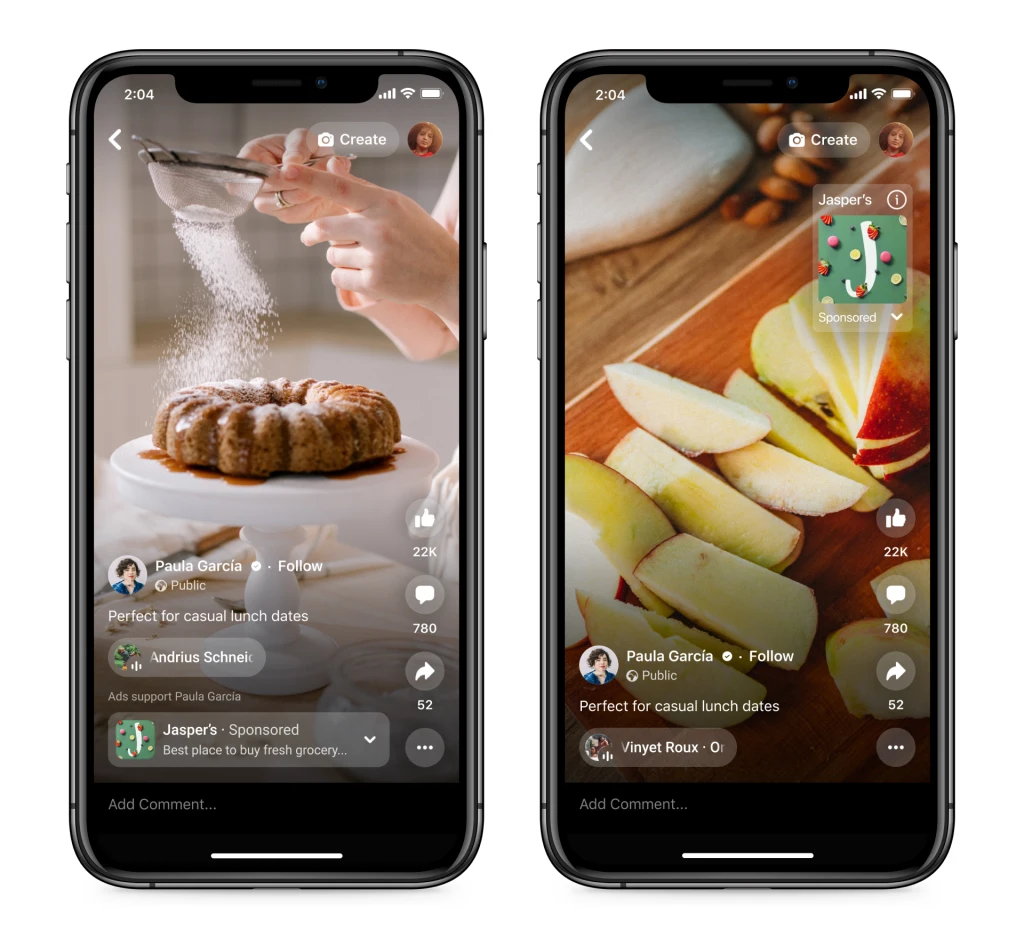
- Single-image overlay ads: These are simple banner ads that pop up near the bottom of your Reel shortly after it starts playing.
- Image carousel overlay ads: These show a swipeable row of 2 to 10 image cards along the bottom of your Reel while it plays.
Facebook Stars
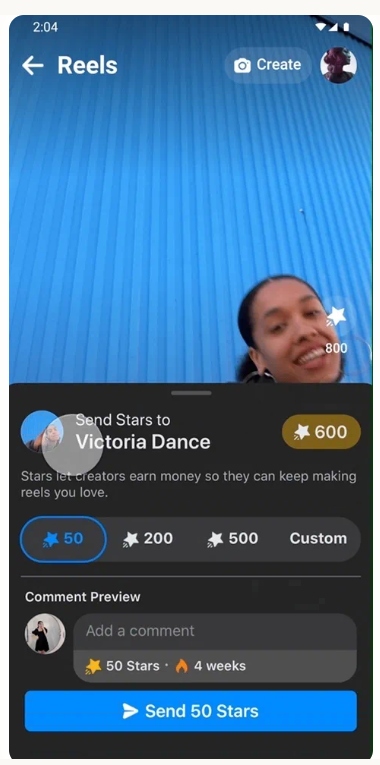
Facebook Stars is a virtual tipping feature that lets viewers support you directly.
Viewers buy Stars on Facebook and send them to you in the comment section while watching your Reel.
Facebook pays you $0.01 USD for every Star a fan sends you.
Performance Bonuses
The Performance Bonus program pays extra cash based on how well your videos do over a 30-day period.
Facebook sets a maximum monthly earnings limit and pays you based on your total views, comments, and shares. Creating videos that encourage viewers to ask questions or share the clip with friends helps increase your bonus checks.
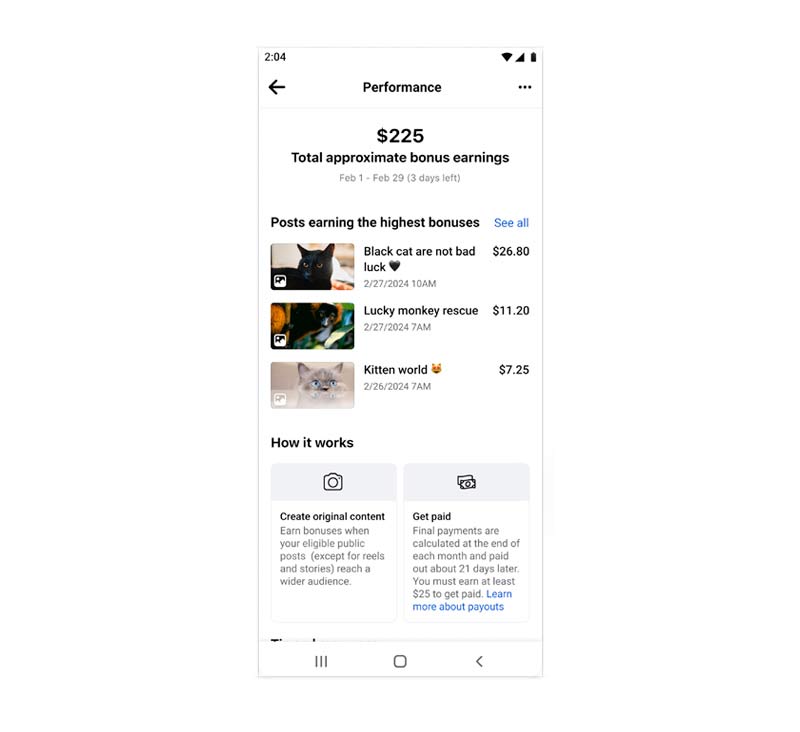
Performance bonuses can be really easy to earn if you have a good content strategy for Reels. No ads, no partnerships, simply make money by reaching more audiences.
Brand Partnerships
Brand partnerships happen when a company pays you directly to feature their product or service in a Reel.
Instead of relying on ad revenue splits, you negotiate a flat fee or commission with the brand. When you post a sponsored Reel, Facebook requires you to use their Paid Partnership tag so viewers know it is an ad.
You also need to follow basic disclosure rules set by the Federal Trade Commission by adding simple tags like #ad to your caption.
Affiliate Links
Affiliate marketing lets you earn a commission by promoting products you already use and like.
You record a short video demonstrating a tool or product, then tell viewers where to find your purchase link.
You can put your affiliate link in your video caption or pin it at the top of the comment section. When someone buys through your link, the seller pays you a percentage of the sale.
Requirements to Earn Money from Reels
To get paid on Facebook Reels, your account must follow two main policy sets: Partner Monetization Policies and Content Monetization Policies.
Rules and Policy Requirements
Partner policies look at your overall account. You must live in an eligible country, follow Community Standards, and build a real audience. Buying fake views or followers will get your account banned from monetization.
Content policies look at the specific videos you post. Facebook will not pay for low-effort content like slideshows, still images, or looped clips.
Taking videos from other platforms or other creators and re-uploading them without adding original commentary or edits will also cause you to lose monetization access.
You can read the full list of rules on Meta Partner Monetization Policies.
Minimum Views and Audience Required
To unlock payouts, your account needs to hit a few standard account benchmarks:
- You must be at least 18 years old.
- You must live in an approved country.
- Your account must be active for at least 30 days.
- Standard video ads require 5,000 followers and 60,000 total view minutes over the past 60 days.
Some features, like Ads on Facebook Reels, are invite-only. Facebook sends invitations automatically when you post original videos regularly and build consistent views.
How to Set Up Monetization and Get Paid
Setting up payouts takes only a few minutes once you qualify. Completing your financial details correctly prevents payment delays later.
Preparing Your Account Details
- Open the Facebook app on your phone or log in on a computer.
- Go to your main profile or Page and click the Professional Dashboard button.
- Inside the dashboard, tap the Monetization tab.
Facebook will show you a list of monetization tools. Click Get Started next to any tool you qualify for, confirm your details, and accept the standard creator terms.
Setting Up Payment and Tax Information
To get your money, you need to connect a bank account or PayPal account and submit basic tax details.
Facebook allows you to connect a local bank account for direct deposit or link a PayPal account. You will need to enter your legal name, home address, date of birth, and tax identification number (such as a Social Security Number or business tax ID).
US creators fill out a digital W-9 form during setup, while non-US creators complete a W-8BEN form.
Facebook issues payouts around the 21st of each month for the money you made during the previous month. Your account balance needs to reach at least $100 before Facebook releases the payment.
FAQs about Facebook Reels Monetization
Facebook does not set a fixed view count requirement before payouts start once you are accepted into a monetization program. Once enabled, you earn money as soon as viewers watch ads on your Reels or send you Stars.
Yes, as long as your videos are original and offer clear value. Faceless video formats like voiceover tutorials, software walkthroughs, cooking clips, hands-on craft videos, and digital art recordings work very well.
When a claim occurs, the ad money generated by that video goes to the music copyright owner instead of you. You should use royalty-free tracks from Meta’s built-in Sound Collection or stick to your own original audio recordings.