







 Shopify Development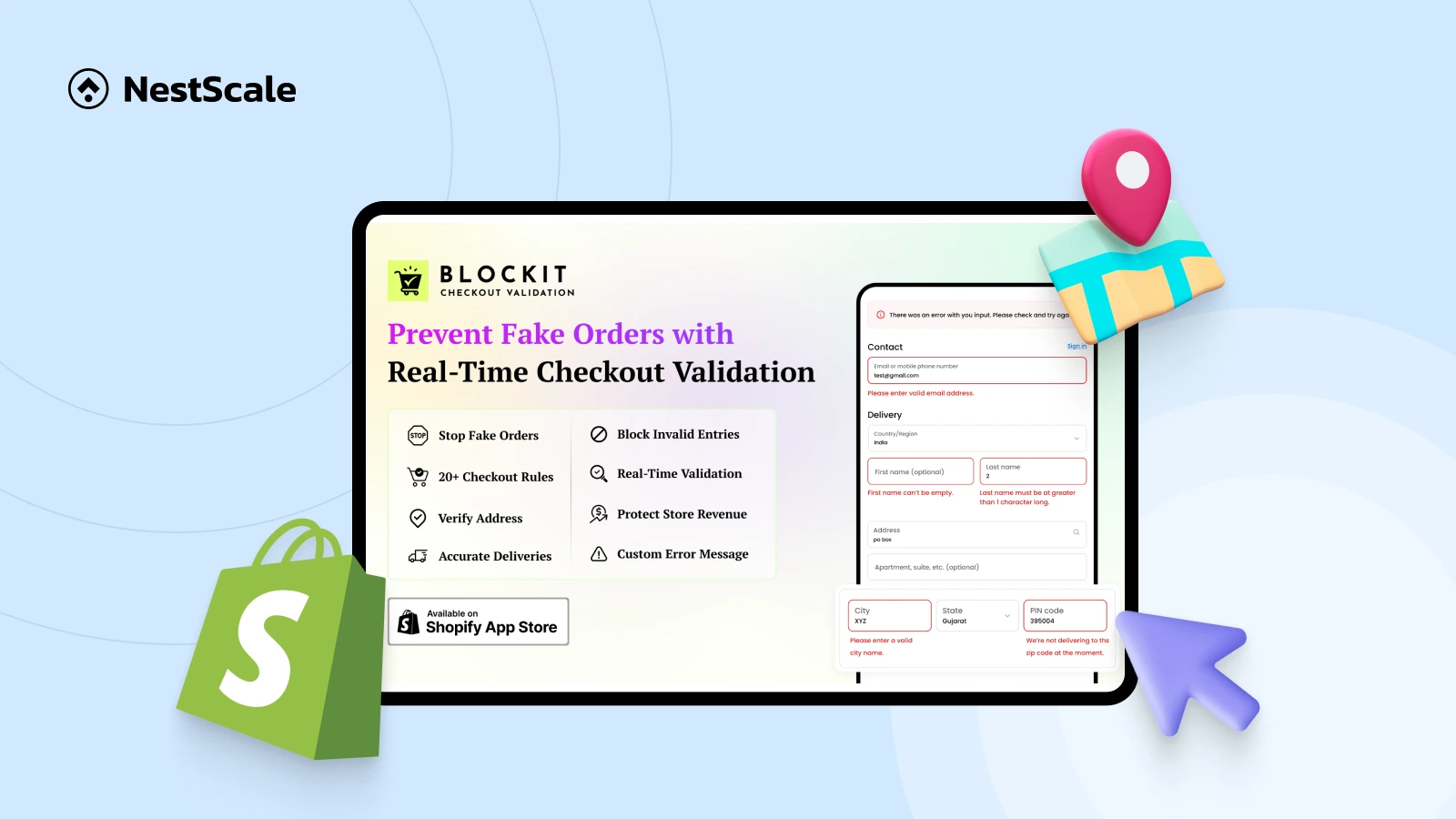
Invalid and fake shipping addresses are one of those sneaky problems nobody plans for, but sometimes happens. The result includes lost revenue, slower fulfillment, and support teams stuck explaining things they can’t fix.
In this guide, we’ll dig into how you can stop invalid and fake shipping addresses before they become orders, why address validation matters more in 2026 than it ever did before, and how to add smart checkout validation on Shopify without wrecking your conversion rate in the process.
Because blocking bad orders is important — but not at the cost of good customers.
What is a Shopify Address Validator?
A Shopify address validator is a tool that verifies shipping addresses in real time during checkout to ensure they are deliverable and compliant with the store’s delivery rules.
To be more specific, a Shopify address validator makes sure that the address is:
- Deliverable by standard courier and postal services
- Properly formatted with correct street, city, state, and postal code
- Free from fake, incomplete, or auto-generated address data
- Aligned with carrier standards (ZIP, state, country, region rules)
- Not using restricted address types like P.O. Boxes (if blocked by the store)
- Submitted with valid country–state–ZIP combinations
- Compliant with store-specific shipping and delivery rules
- Checked before order placement to avoid post-checkout issues
- Able to pass fulfillment, label creation, and shipping software checks
Instead of fixing errors after an order is placed, address validation ensures only clean and usable address data reaches your order management and fulfillment systems.
What Does It Validate?
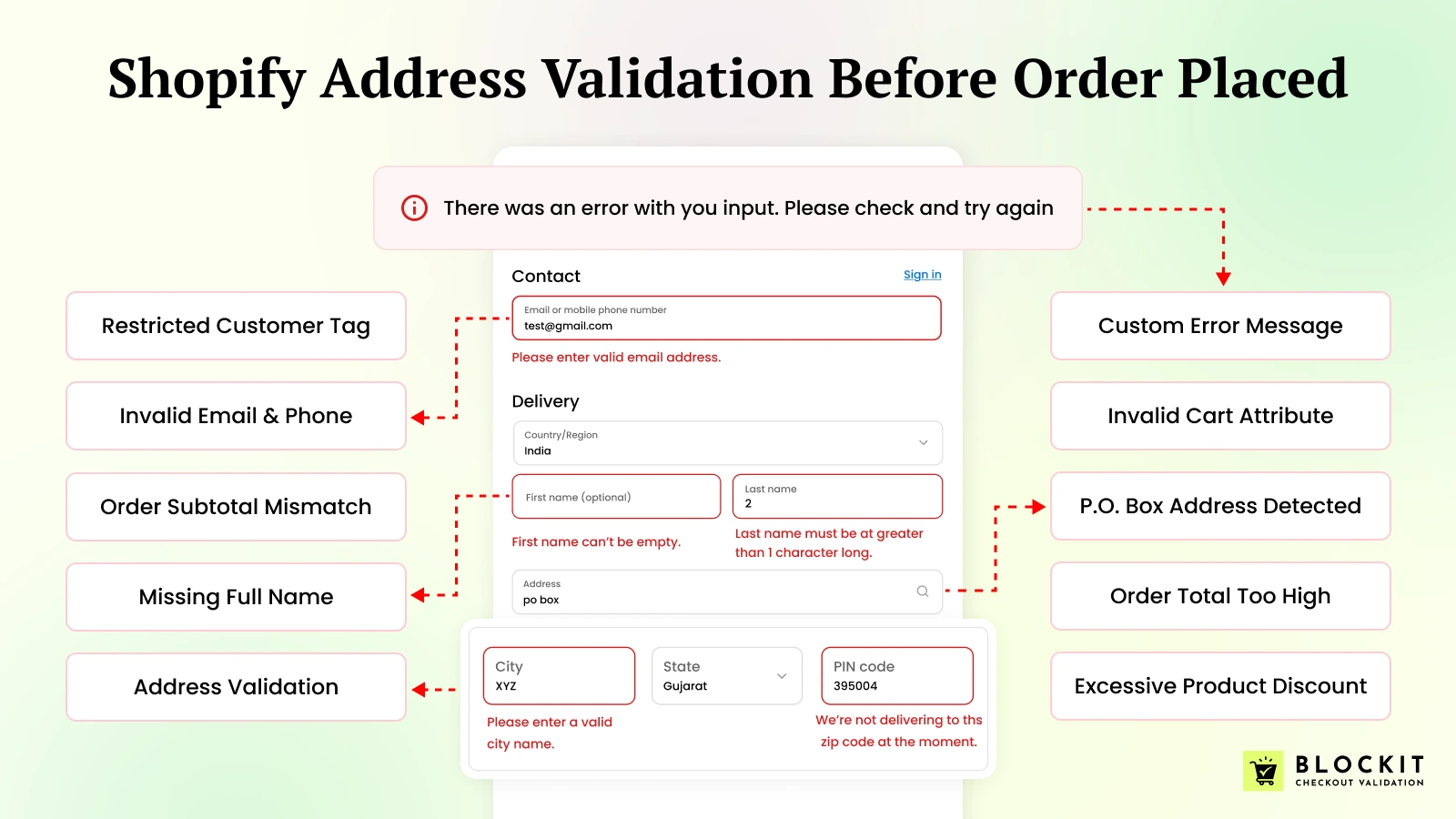
A modern Shopify address validation setup checks for:
- Invalid or non-existent ZIP / postal codes
- Missing house numbers, street names, or locality details
- Fake city and state combinations that don’t exist geographically
- Random or suspicious address strings entered to bypass checkout
- P.O. Box addresses when physical delivery is required
- Unsupported, restricted, or blocked countries and regions
- Address formats that don’t match country-specific standards
- Incomplete shipping addresses that may cause delivery failures
- High-risk address patterns commonly used in fake orders
- Address inputs that conflict with selected shipping methods
These checks help stop fake and invalid orders at checkout, reduce delivery failures, prevent RTO losses, and keep fulfillment operations smooth—without affecting genuine customers.
10 Reasons Why You Need a Shopify Address Validator
Wondering if an address validator is just a “nice-to-have” or an actual must-have? Let me save you the suspense — it’s definitely the latter.
- Stop Fake Orders in Their Tracks: Fake orders often come with nonsense addresses or half-baked info. A validator catches them right at checkout, before they ever hit your fulfillment queue.
- Cut Down on Failed Deliveries: Nothing’s worse than sending a package that bounces back. Invalid addresses mean reships, lost inventory, and wasted time — all things a validator can prevent.
- Save on Shipping and RTO Costs: Every failed delivery hits your bottom line. Verifying addresses upfront ensures your parcels actually reach real people.
- Keep Your Data Clean: Accurate addresses make fulfillment smooth and keep your logistics partners happy. It’s that simple.
- Catch Fraud Early: Many fake orders are part of bigger fraudulent schemes. An address check acts like a first line of defense, stopping trouble before payment is processed.
- Improve Customer Experience: Your shoppers get instant feedback if they mistype an address — no awkward post-purchase emails or awkward “where’s my order?” calls later.
- Fewer Support Headaches: Speaking of which, fewer errors mean fewer tickets. Your support team can focus on real issues, not chasing down lost packages.
- Block High-Risk Locations: Some regions just attract more fraud than others. You can easily restrict shipping by country, state, or ZIP code.
- Better Conversion Quality: Sure, a high checkout number feels nice, but what’s the point if half of them are fake? Address validation ensures the buyers you do get are real.
- Built to Scale: Manual checks? Forget it once your store hits hundreds or thousands of orders. A validator grows with you, keeping mistakes off autopilot.
How Invalid Addresses Impact Conversion Rate & Shipping Costs
Many merchants worry: “Won’t validation hurt conversions?”
In reality, the opposite is true.
The Real Impact of Invalid Addresses:
| Issue | Business Impact |
| Fake orders | Payment disputes & fraud |
| Wrong ZIP codes | Delivery failures |
| Incomplete addresses | Delayed shipping |
| Random data | Carrier surcharges |
| Returned orders | Lost revenue |
Methods to Validate Addresses on Shopify
Method 1: Shopify’s Built-In Address Validation (Basic)
Okay, so Shopify does offer a built-in way to catch bad addresses, but honestly… It’s pretty basic. When a customer types in something that looks off — maybe a missing street number, a weird ZIP, or just a typo Shopify can sometimes suggest fixes or throw an error before they complete checkout.
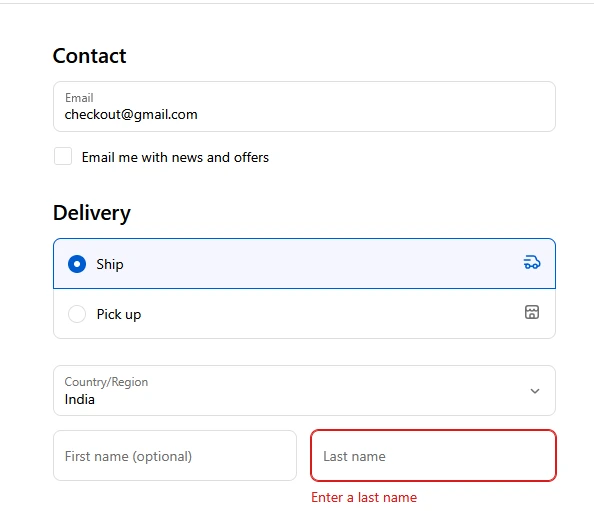
But here’s the thing: it only shows suggestions when it’s really sure about what the correct address should be.
This little feature can help with:
- Dodging invalid shipping addresses
- Avoiding delayed or failed deliveries
- Cutting down on those annoying post-checkout corrections
Now, here’s the catch. If this validation is turned off, or if the customer’s address is outside Shopify’s supported countries, they can still check out just fine. Yup, bad addresses can still slip through.
What Shopify Checks Automatically
Even without advanced settings, Shopify does a few basic sanity checks on every address:
- Makes sure all required fields are filled (no blanks allowed)
- Ensures the format looks correct
- Checks that nothing is too long for the fields
These rules apply everywhere — every country, every region. It’s not bad, but let’s be real: for bigger stores or international shipping, this alone won’t stop all the headaches.
You’ll still need a more robust solution if you want to actually block fake or invalid addresses before they hit your fulfillment team.
How to Enable Shopify Address Validation
You can enable Shopify’s default address validation by following these steps:
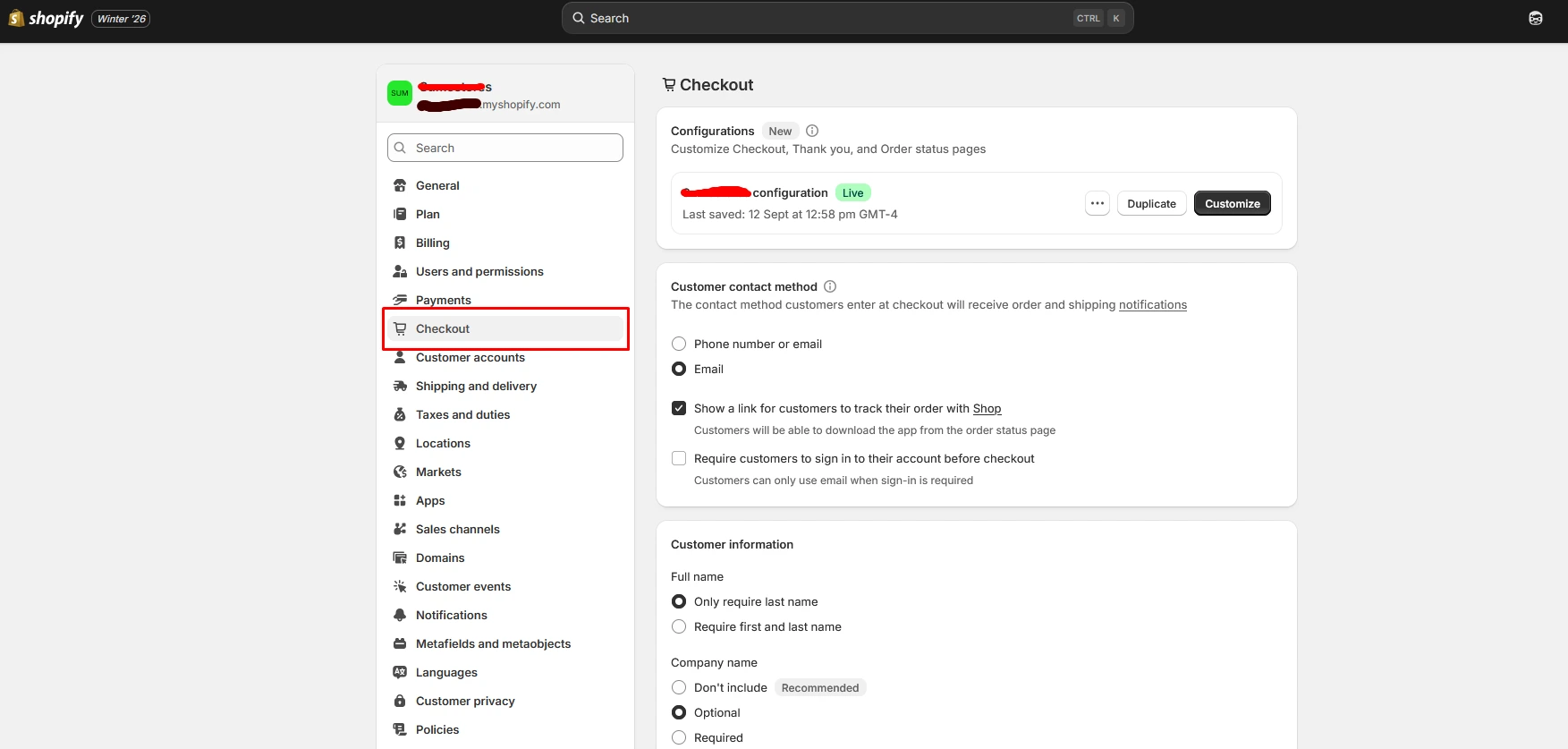
Step 1: Go to Shopify Dashboard → Settings → Checkout in your Shopify admin
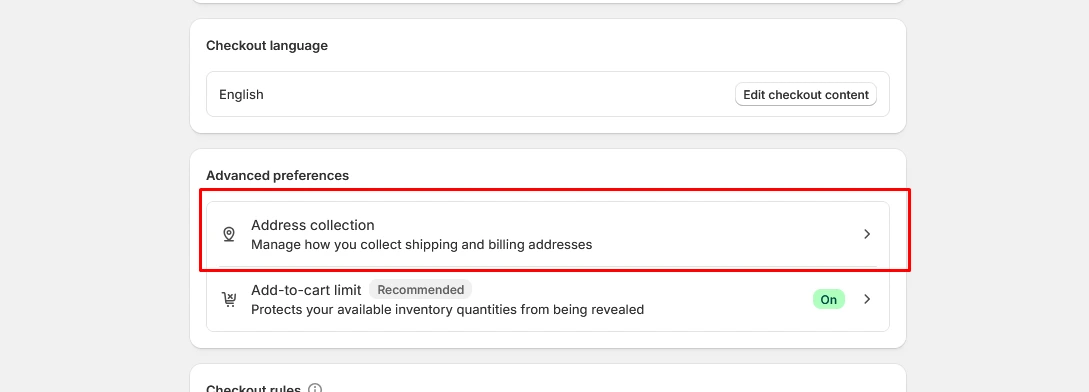
Step 2: Scroll Down to Advanced preferences & Click Address collection
Step 3: Enable Validate shipping address
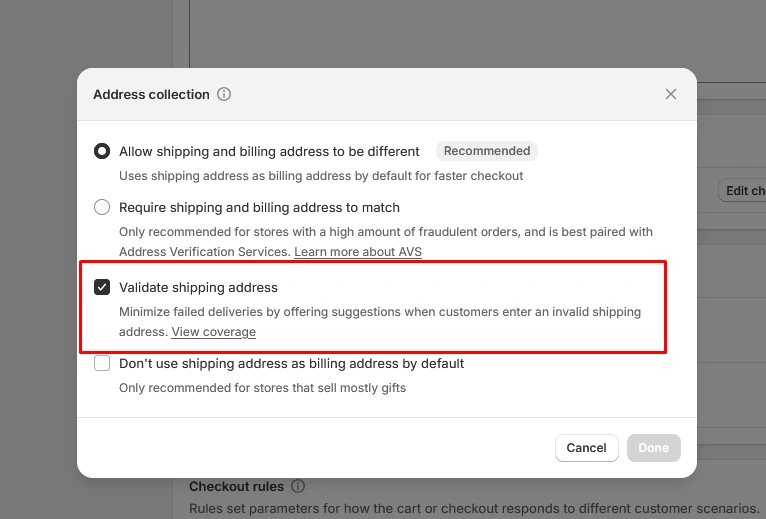
Step 4: Click Done
Explore Shopify’s default shipping address validation feature to understand how it helps reduce errors at checkout.
Limitations of Shopify Native Validation
❌ No real-time address blocking at checkout
❌ Cannot prevent fake or invalid orders
❌ No P.O. Box blocking rules
❌ No custom checkout address validation rules
❌ No country-level restrictions
❌ No state or region-level restrictions
❌ No ZIP or postal code blocking
❌ No enforcement (suggestions only, not mandatory)
❌ No conditional checkout rules
❌ No custom error messaging
Method 2: Third-Party Shopify Address Validator Apps (Recommended)
This is where serious merchants win.
A third-party Shopify address validator app adds real-time logic directly to checkout.
These apps extend Shopify’s checkout with advanced checkout validation rules that actively block bad orders in real time.
What Advanced Address Validator Apps Can Do
- Block fake order Shopify checkouts instantly
- Validate address structure & deliverability
- Restrict P.O. boxes, ZIP codes, or regions
- Show custom error messages
- Combine address checks with email & phone validation
- Apply rules based on cart value or product type
Best Third-Party Shopify Address Validator: Blockit
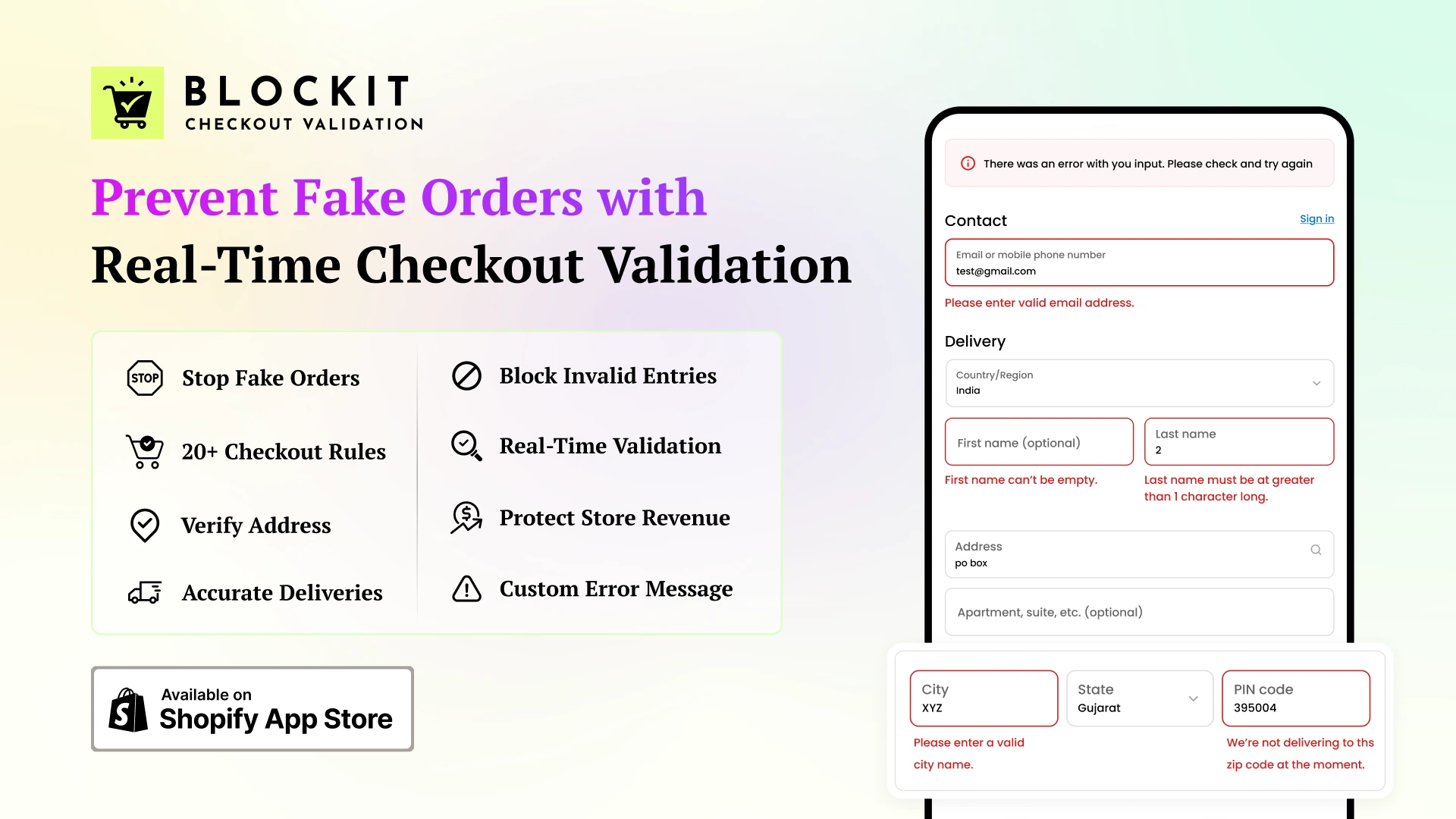
To take address validation to the next level, many Shopify merchants turn to third-party apps that add real-time logic and advanced rules directly to checkout.
One of the top solutions is Blockit, designed to prevent fake orders, validate addresses, and enforce custom checkout rules without affecting genuine customers.
Key Features
- Block fake Shopify checkouts instantly
- Validate address structure and deliverability
- Restrict P.O. boxes, ZIP codes, or high-risk regions
- Show custom error messages during checkout
- Combine address checks with email and phone verification
- Apply rules based on cart value, product type, or location
- Monitor rejected orders and refine rules for accuracy
Blockit gives merchants full control over checkout, reduces failed deliveries, and ensures that only valid, deliverable orders reach fulfillment. It’s ideal for stores looking to scale safely and reduce losses from fraudulent or invalid orders.
Example Use Cases
- Block international shipping for specific products
- Prevent fake orders using random address strings
- Stop high-risk ZIP codes during promotions
- Enforce full address entry (street + house number)
This approach gives you control, accuracy, and scalability.
Best Practices for Shopify Address Validation (2026)
To stay aligned with Google Helpful Content and real-world UX:
- Use Friendly Error Messages: Avoid harsh warnings. Guide users clearly.
- Validate in Real Time: Don’t wait until after payment.
- Combine with Checkout Validation: Address + email + phone checks = stronger fraud prevention.
- Monitor Rejected Orders: Refine rules based on real data.
- Balance Security & UX: Lock fake orders—not genuine customers.
Final Thoughts: Is a Shopify Address Validator Worth It?
Short answer? Absolutely.
If you’re serious about growth, profitability, and operational efficiency, a Shopify address validator is no longer optional—it’s essential.
It helps you:
- Prevent fake orders on Shopify store
- Block invalid shipping addresses
- Reduce shipping losses
- Improve checkout accuracy
- Protect revenue at scale
In 2026, smart stores don’t just optimize conversions, they optimize order quality.
👉 Related:
Shopify Conversion Rate Optimization: Best Strategies
How to Show Variants as Separate Products in Shopify? (2025 Tutorials)
FAQs: Shopify Address Validator
The best solution is a third-party app like Blockit that supports real-time checkout validation, custom rules, and address blocking logic.
Yes. Using advanced Shopify checkout validation, you can block fake orders before payment.
No. When implemented correctly, it improves conversion quality and reduces post-purchase friction.
Yes, with third-party address validation apps.
For low-volume stores, maybe. For growing stores, it’s insufficient.