





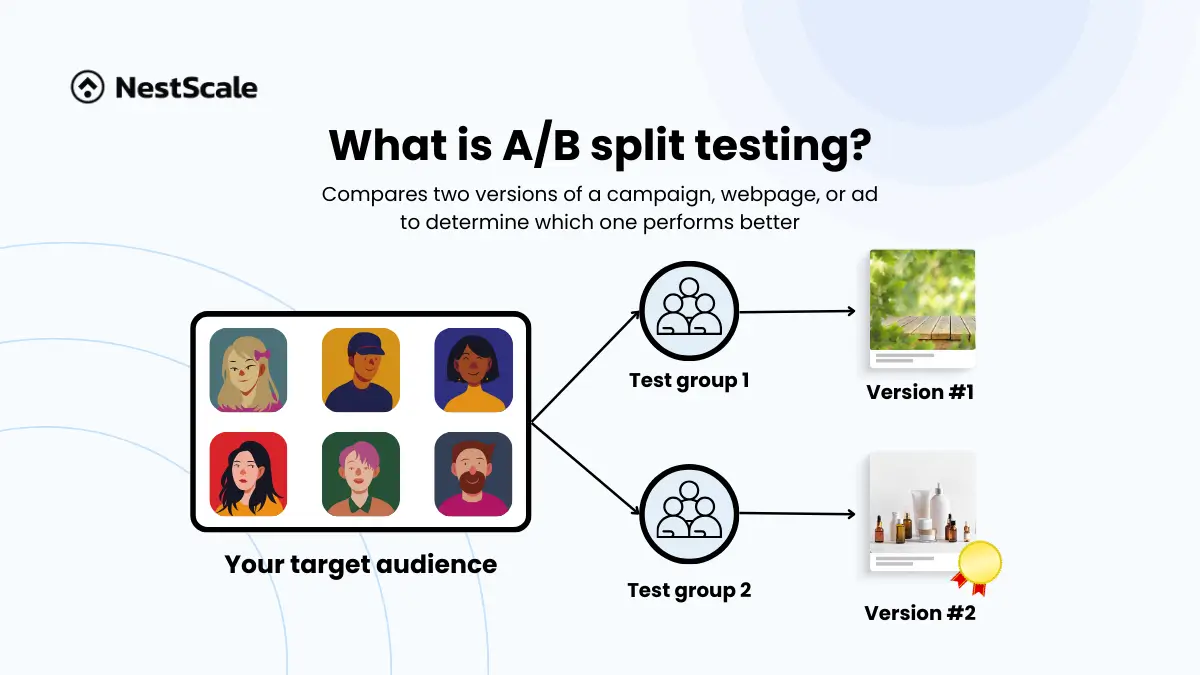
What is A/B split testing?
A/B split testing is a marketing method that compares two versions of a campaign, webpage, or ad to determine which one performs better. By showing one version (A) to half your audience and the other version (B) to the other half, you can track their behavior and identify the most effective option based on metrics like click-through rates, conversions, or revenue.
A/B split testing has become a popular and effective method for optimizing your marketing strategy using data-driven insights. Leading platforms like Meta Ads, TikTok, and Google Ads now offer features to help you test and optimize your campaigns effectively. For testing on your website, tools like Google Optimize provide the support you need to experiment and uncover what resonates best with your audience.
How does A/B testing work?
Here’s a simple guide to get started with A/B testing:
- Choose what to test: Focus on one element to test, such as headlines, CTA buttons, images, or email subject lines.
- Divide your audience: Split your target audience into two equal groups randomly.
- Run the test: Show one group version A and the other group version B.
- Analyze the results: Use analytics tools to compare performance and pick the winner.
For example, let’s say you’re running a Facebook ad with two different headlines. Group A sees “Shop the Best Deals Now,” while Group B sees “Exclusive Discounts Just for You.” The data might reveal which one attracts more clicks and drives more sales.
Why is A/B testing important for your business?
In today’s competitive landscape, guessing what works in your marketing strategy isn’t enough. A/B split testing’s main purpose is to remove the guesswork, helping you:
- Boost conversions: Learn what resonates with your audience to improve your conversion rates.
- Enhance ROI: Optimize campaigns to ensure every dollar you spend delivers maximum returns.
- Understand customer behavior: Gain valuable insights into what your customers like and respond to.
Best practices for A/B Split Testing
- Test one variable at a time: Changing too many things at once can muddle your results.
- Set clear goals: Know what you’re measuring—clicks, signups, or sales.
- Run the test long enough: Ensure you have enough data for statistically significant results.
- Keep testing: Consumer behavior evolves, so continuously test and refine.
FAQs
In marketing, A/B testing is a data-driven method used to optimize campaigns and user experiences. Marketers show two variations of a marketing asset — such as an email subject line, ad copy, or landing page — to different segments of an audience.
By measuring which version drives more conversions, sales, or engagement, marketers can eliminate guesswork and maximize their return on investment (ROI).
1. Identify a Goal: Choose a metric to improve, like click-through rates.
2. Create a Hypothesis: Formulate a change (e.g., “Changing the headline will increase sign-ups”).
3. Build a Variant: Create version B alongside your original version A.
4. Run the Test: Use a tool to split live traffic evenly between both versions.
5. Analyze Data: Deploy the winning version once results are statistically significant.
Ideally, run it until you achieve a statistically significant result, which depends on your audience size and traffic volume. Typically, we recommend running your A/B test for at least 7 days to ensure accurate and reliable insights.
While often used interchangeably, they differ in execution. A/B testing compares two versions of the same web page or app element (like changing a button’s color) to see which performs better. Split testing (or split URL testing) divides traffic between two completely different URLs or entirely redesigned pages.